ANY-maze Help > The ANY-maze reference > The Support page > Drivers
Drivers

 | Only Windows administrators can install and uninstall drivers. You'll also need to be an ANY-maze administrator, unless your administrator has specified in the Administrative options that all users, not just administrators, can do this. |
Overview
The Drivers page is used to install and uninstall various drivers used by ANY-maze, and to resolve driver-specific issues.
| • | The 'Drivers' section of the Support page |
| • | Installing and uninstalling drivers |
| • | Resolving problems |
| • | Detailed information about all the ANY-maze drivers |
The Drivers section of the Support page
You can manage ANY-maze drivers by selecting the Support page and then clicking the  Drivers option. You'll be shown a list of all the drivers available for use with the devices you have connected - see figure 1.
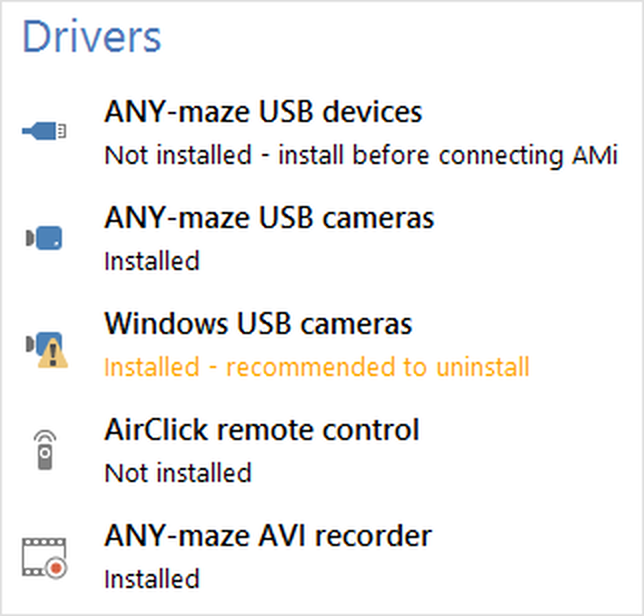
Figure 1. The Drivers section of the ANY-maze Support page.
Installing and uninstalling drivers
To install or uninstall a driver, you simply need to select it in the list of drivers and then click either the  Install driver or
  Uninstall driver button in the ribbon bar.
However, you may find that the appropriate button is disabled (shown in grey), preventing you from performing the operation. This can occur for the following reasons:
| • | The driver is already installed - so the Install driver button will be disabled. |
| • | The driver is not installed - so the Uninstall driver button will be disabled. |
| • | You are not an administrator*. Only administrators can install and uninstall drivers. |
| • | A test is currently being performed. You can't install or uninstall drivers while a test is running. |
| • | The driver cannot be installed or uninstalled from within ANY-maze. For example, the entry for the 'Adlink RTV-24' driver reflects the status of the installed driver, but doesn't permit you to install or uninstall it. On the other hand, the entry for 'Microsoft MPEG-4 codec' reflects whether the codec is installed, and if not allows you to install it - but the codec can't be uninstalled from within ANY-maze. |
* In order to install or uninstall drivers, you must be a Windows administrator, and running ANY-maze with administrator privileges.
Resolving problems
Under the name of each driver in the list is its status; normally this will read 'Installed' or 'Not installed'. However, in some situations an error or warning message may be displayed. Errors are shown in red text, and warnings in orange.
You can see more details about this message by selecting the driver in the list and clicking the  Driver details button in the ribbon bar. This will open a pop-out help window displaying a help topic specific to that driver, which will include further information about the error or warning and how to resolve it.
Detailed information about all the ANY-maze drivers
For full details about the individual drivers that can be shown in the list, refer to the following topics:
 | Some drivers are only available under certain versions of Windows, so you may find that the list of drivers on your computer does not include all those shown here. |
| • | ANY-maze USB device driver |
| • | ANY-maze USB camera driver |
| • | Windows USB camera driver |
| • | Adlink RTV-24 driver |

© Copyright 2003-2026 Stoelting Co. All rights reserved
ANY-maze help topic T0974