ANY-maze Help > The ANY-maze reference > The Options page > Managing users in ANY-maze > An introduction to managing users
An introduction to managing users

Overview
In most labs, ANY-maze will probably be used by more than one person. While this doesn't actually make any difference to the system, it could easily cause confusion or frustration if different users change the program's options and settings to those they prefer.
To avoid these types of problems, and to allow individuals to personalise ANY-maze so it suits their own way of working, ANY-maze stores options and other settings on a per-user basis. Of course, this means that the system has to know who's actually using it, and this is achieved by having user accounts - one for each user of the system.
| • | User accounts |
| • | The settings which ANY-maze records for each user |
| • | ANY-maze administrators |
| • | Using ANY-maze or Windows to manage user accounts |
User accounts
Although user accounts may sound a little complicated, they're actually very simple - essentially they're just a list of the names of the people who might use ANY-maze.
For example, imagine Dave, John and Mary all work in the same lab. They might all want to use ANY-maze, so you'd set them up to each have a user account. Then, each time one of them starts using ANY-maze, they'd simply have to identify who they are - ANY-maze would then be able to use their personal settings without interfering with those of the other users.
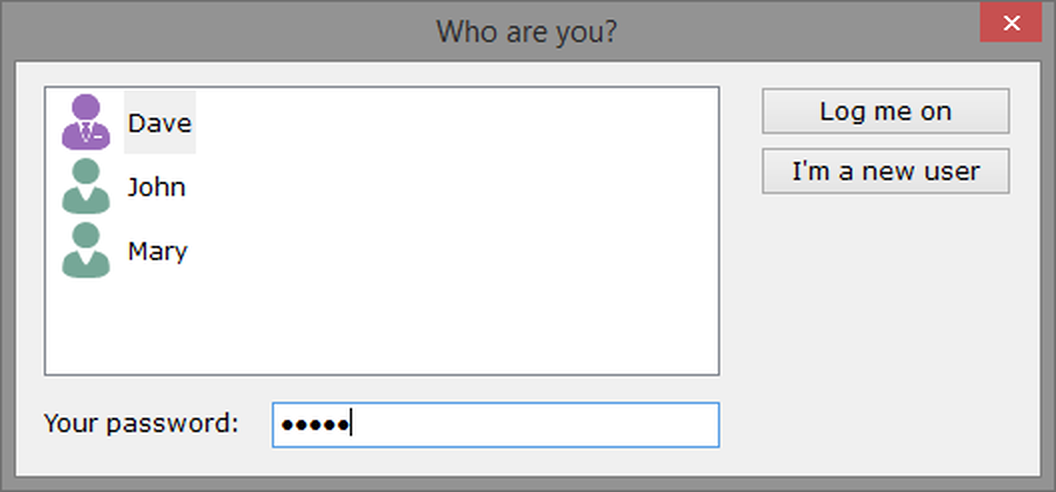
Figure 1. The ANY-maze log-on window - to start using the system, users simply have to identify themselves.
The settings which ANY-maze records for each user
Of course, the actual benefit of having different settings for each user depends on what those settings actually are. In ANY-maze, the system will maintain the following information separately for each user:
| • | The user's name. |
| • | An optional password. |
| • | The position and size of the ANY-maze window, the last time it was used (and that of the popped-out help window, if applicable). |
| • | Some of the information entered on the Options page, for example: |
| • | The visual theme and font size used by ANY-maze. |
| • | The colours of some elements of the software. |
| • | Sounds which should be played when specific events occur - such as the end of a test. |
| • | The terminology used within ANY-maze - for example, you can ask the system to refer to zones as 'areas', or measures as 'parameters'. |
| • | Whether the user's password should be used to protect their experiment and protocol files. |
| • | The folder where the user will generally store his/her experiment files. |
| • | Whether the system should automatically save experiments when they're closed, and whether it should automatically keep backup copies. |
| • | The headers and footers to be printed on documents, and a note as to whether documents should be printed in colour or black and white. |
ANY-maze administrators
To actually manage user accounts requires an administrator. As the name implies, this person administers the accounts - adding new ones, deleting old ones etc. (see figure 2, below). In fact, in ANY-maze an administrator has other abilities as well - specifically, administrators can:
| • | Activate / deactivate an ANY-maze licence. |
| • | Update the ANY-maze software. |
| • | Install and uninstall drivers. |
| • | Set various global options which affect all users. |
As you can see, an administrator doesn't just manage the ANY-maze user accounts, but administrates the entire system - for this reason it's normal to have just a single administrator.

Figure 2. The User Management section of the ANY-maze Options page. Using this page, an ANY-maze administrator can add, edit or delete users and set overall user policies.
Using ANY-maze or Windows to manage user accounts
You're probably used to the fact that whenever you start Windows, you have to provide a 'log-on' name and password. This is because Windows itself has user accounts, and you can't start using the system without first identifying who you are.
Clearly then, in these versions of Windows, the system already knows who you are, so why do you need to identify yourself in ANY-maze too? Actually, you don't - if you wish to, ANY-maze can simply use these Windows user accounts to differentiate users, rather than maintaining user accounts itself.
So in effect, there are two ways to manage users in ANY-maze - either by using Windows user accounts, or by getting ANY-maze to manage its own accounts. Here are some notes to help you decide which option is best for you.
Advantages of using Windows user accounts
| • | Using Windows users is more secure. ANY-maze users are not intended to be highly secure - the intention being simply to provide a way to separate user information, rather than secure it. |
| • | If you already have a well-defined policy for Windows users, with personal secured folders etc., then using Windows users will mean ANY-maze simply slots into your existing strategy. |
Advantages of using ANY-maze user accounts
| • | The ANY-maze user log-on window is very simple and easily understood - see figure 1, above. Indeed the administrator can decide whether passwords are actually required or not. |
| • | Managing users in ANY-maze is very simple - see figure 2, above. |
| • | The administrator can decide whether new users can create their own accounts, or whether the administrator has to do this for them. Letting new users create their own accounts is a handy way to reduce bureaucracy and help prevent 'sharing' of user accounts (which would rather defeat the point of having them). |
| • | Users can set the system to automatically protect their experiment and protocol files using their passwords - this helps prevent situations in which one users alters another's files. Note that you can protect files when using Windows users too - just not automatically. |
| • | ANY-maze's self-repairing features, which automatically re-install ANY-maze system files if they get deleted, will work for all users - when you use Windows user accounts, they'll only work when an administrator is logged on. |
In summary, unless you already use Windows user accounts and you're comfortable managing them, then it's probably best if you use ANY-maze to manage its own user accounts.
By the way, if you choose to use Windows user accounts then only Windows administrators will be able to perform the restricted operations described above.
See also:
| • | Managing users |
| • | How to change from ANY-maze to Windows user management |
| • | How to change from Windows to ANY-maze user management |
| • | Editing your user name and password |

© Copyright 2003-2026 Stoelting Co. All rights reserved
ANY-maze help topic T0947