ANY-maze Help > The ANY-maze reference > The Protocol page > The elements of a protocol > Testing > Procedures > Writing a procedure using the procedure editor > Errors and warnings while writing a procedure > Warning: This procedure has a loop, but no 'Wait until' statement.
Warning: This procedure has a loop, but no 'Wait until' statement.

Description
This warning is displayed in the list of errors and warnings at the bottom of the procedure editor when a procedure contains a loop, but does not contain any Wait until statements.
More information
A procedure runs through its statements in turn, until it reaches the end of the procedure. If it encounters a loop along the way (either through the use of a Repeat statement or a Go to statement with a Label statement), it repeatedly runs through that loop until the right condition occurs for it to exit the loop (or the procedure finishes). It is only when a procedure reaches a Wait until statement that it stops to take a breather, and allows other procedures the chance to run.
If a procedure doesn't contain a Wait until statement, there is a danger that it will get 'stuck' in a continuous loop, which will prevent other procedures from getting a chance to run themselves. (In fact, ANY-maze tries to detect this situation and give other procedures a chance to run, but it does make the procedure quite inefficient when this happens).
The best way to prevent any problems is to ensure that the procedure has at least one Wait until statement. It is only when the procedure reaches such a statement that it 'takes a breather' and allows other procedures or processing to occur.
Example
The following example shows a procedure with a loop, which doesn't contain a Wait until statement. It continually monitors the animal's position, and outputs this position in (x,y) co-ordinates on the display. This procedure will run, although inefficiently, and may slow down processing of other procedures and tracking.
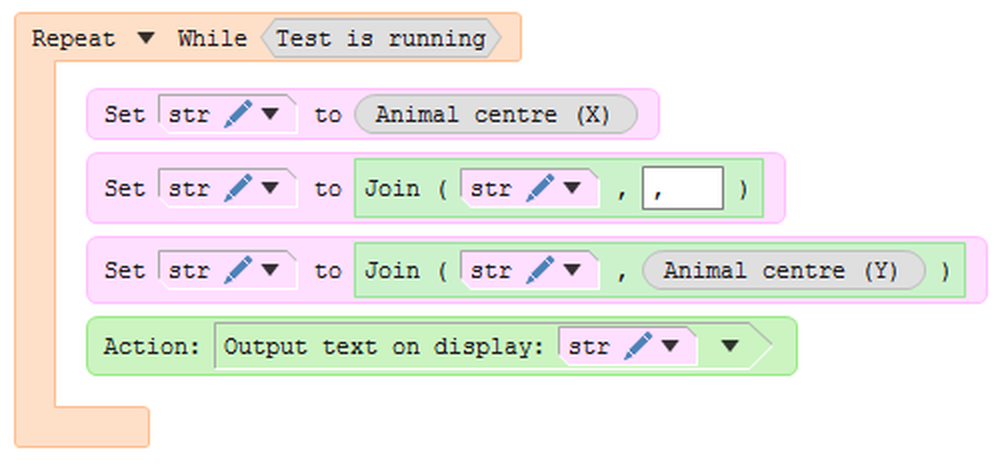
Figure 1. A procedure that is stuck in a loop without a Wait until statement. Although this procedure will work, it will be inefficient and may stop other procedures from running correctly.
This warning can be easily fixed by adding a Wait until statement:
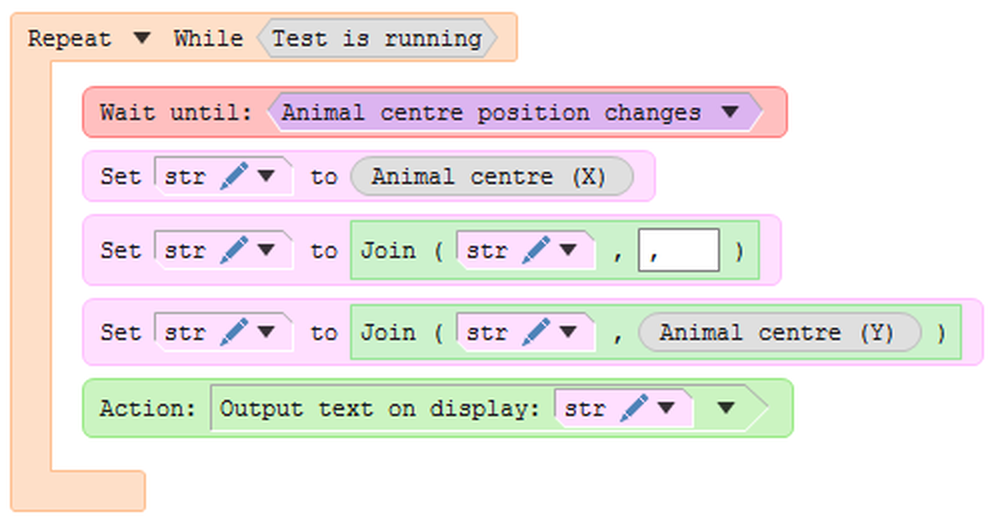
Figure 2. The solution to this is to insert a Wait until statement. The procedure will do exactly the same thing, but will run more efficiently and also allow any other procedures to run properly.
 | If the warning given for the procedure in figure 1 is ignored, and it is used in a test anyway, a run-time warning will also be generated. |
Note that there are circumstances where it is OK to have a procedure without a Wait until statement - for example, if you are just running a procedure to set up some I/O at the beginning of a test. If this is the case, you can just ignore this warning.
See also:
| • | Errors and warnings while writing a procedure |
| • | Errors and warnings while running a procedure |
| • | The Wait until statement |

© Copyright 2003-2026 Stoelting Co. All rights reserved
ANY-maze help topic T0528