|
ANY-maze Help > The ANY-maze reference > The Protocol page > The elements of a protocol > Testing > Procedures > Running procedures > Errors and warnings while running a procedure
Errors and warnings while running a procedure

Introduction
Even if a procedure has been checked for errors in the procedure editor, there is still a chance that it may not run correctly. This can occur if, for example, the result of an expression is not valid (e.g. trying to divide a value by zero). Errors of this type are called 'run-time errors' (because they're only detected when the procedure is run) and if ANY-maze detects any while a procedure is running, it will list them in the Test details report.
Examples of errors
Most 'run-time' errors will occur because the result of an expression is not valid. This might be because the expression uses a variable which does not contain the right type of expression (numeric, True/False, or text), or a numerical calculation results in an invalid number (for example, trying to take the square root of a negative number).
The procedure editor has no idea what the result of these expressions will be until the procedure is actually run, so it can't flag them up as an error in the procedure editor; they will only be caught when the procedure is actually run.
In general, a procedure that contains errors will note the error and then continue to run (if possible).
Note that if a mathematical operation results in an invalid value, the result will be set to #N/A. The procedure will carry on running, but if the value is used in any other mathematical functions, then the result of those will also be #N/A. Note that you can test whether a number is undefined in a procedure using the 'Is undefined' function.
Some examples of the kind of things that will cause run-time errors are:
| | • | Trying to use a variable or value of the wrong type. The most obvious of these is trying to use a text variable in a mathematical function, but there will be other times when ANY-maze can't evaluate a value as the correct type. In general, ANY-maze tries to convert where possible, so if a True/False value is required, then zero will be false and non-zero will be true. Converting a numerical or True/False value to text will always succeed. |
| | • | Using an invalid index for an array variable. If a variable has been set up to be an array with 5 values, then you can only access the indexes of this variable using the values 1 to 5. If you're using the result of an expression to determine the index, and the expression's result is not within this range, an error will be reported (and the value #N/A will be returned for the value of the variable at that index). |
| | • | Using values in a mathematical operation that will cause it to overflow. For example, calculating the square root (Sqrt) of a negative number, dividing by zero, or calculating the inverse sine (Sin-1) of a number that is not in the range -1.0 to 1.0. |
How you get notified of any errors
If any errors or warnings occur when a test is run, a yellow information bar will appear at the top of the ANY-maze screen, informing you of this fact. You'll also find the _imgwndtestdebugbutton_ (test debug output) button is highlighted; if you click on this button then the Test debug output window will open so you can view the error(s) and/or warning(s) that occurred.
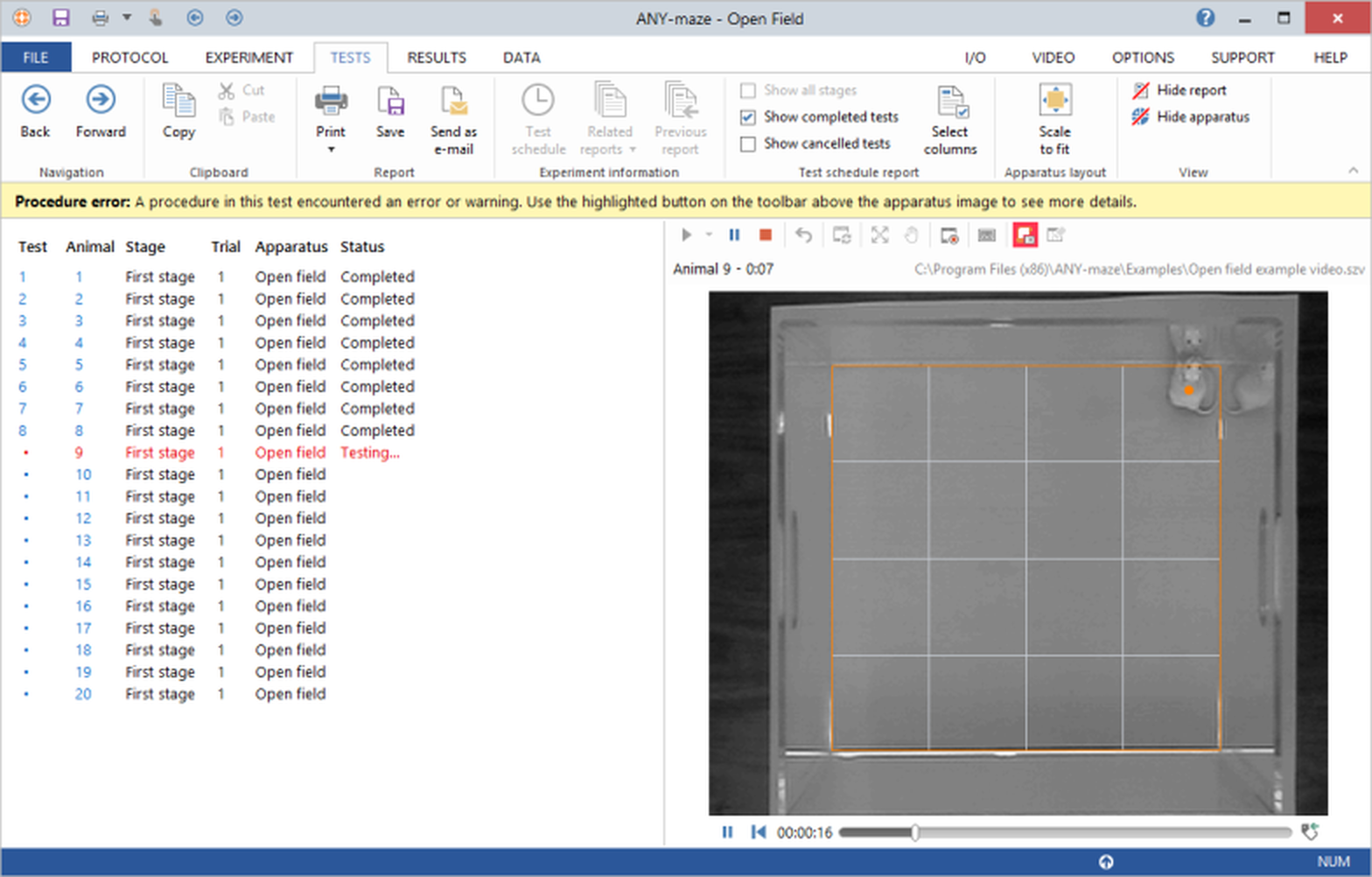
Figure 1. The information bar that appears if a procedure encounters any errors or warnings during the test.
You'll also get a message box displayed at the end of the test. Any errors and warnings will be listed, alongside the name of the procedure and the test clock at the time the error occurred, in the Test details report for the test.
Errors and warnings
The following errors and warnings can happen when the test is run:
Errors
Warnings
Information messages
See also:

© Copyright 2003-2026 Stoelting Co. All rights reserved
ANY-maze help topic T0471
|