ANY-maze Help > The ANY-maze reference > The Protocol page > The elements of a protocol > Testing > Test window panels > What to show on the Session log panel
What to show on the Session log panel

Introduction
The Session log panel on the Test window shows events happening during a test, as shown in figure 1:
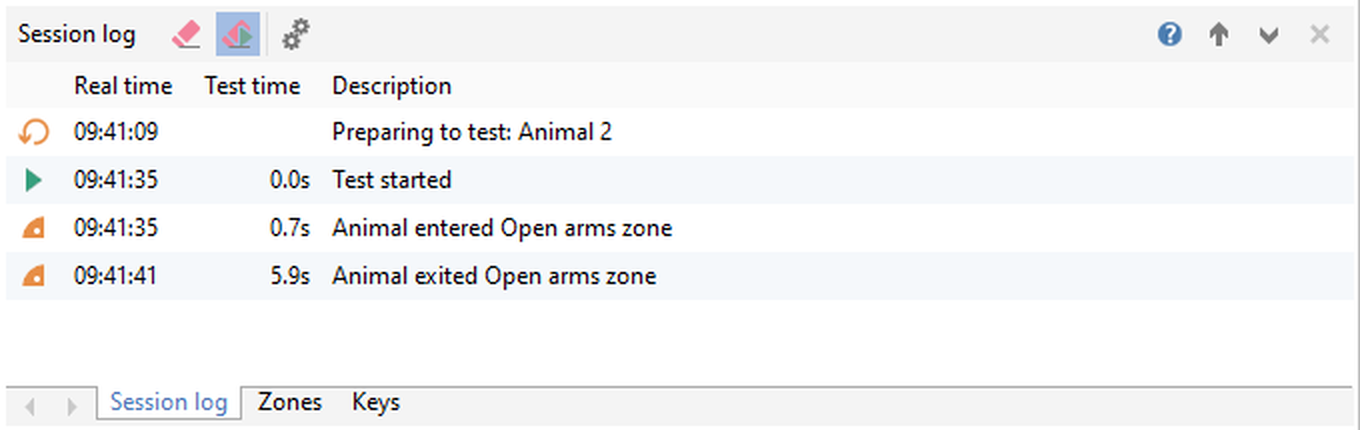
Figure 1. The Session log panel, showing information about the test that is currently running.
The 'What to show on the Session log panel' settings allow you to choose which information should be logged on the Session log panel.
More details
The Session log panel can show a log of information about the various events that occur during a test - from starting and stopping of tests, through to zone entries, I/O events, key presses and more. These settings allow you to choose which events you're interested in seeing on the Session log panel as the test progresses.
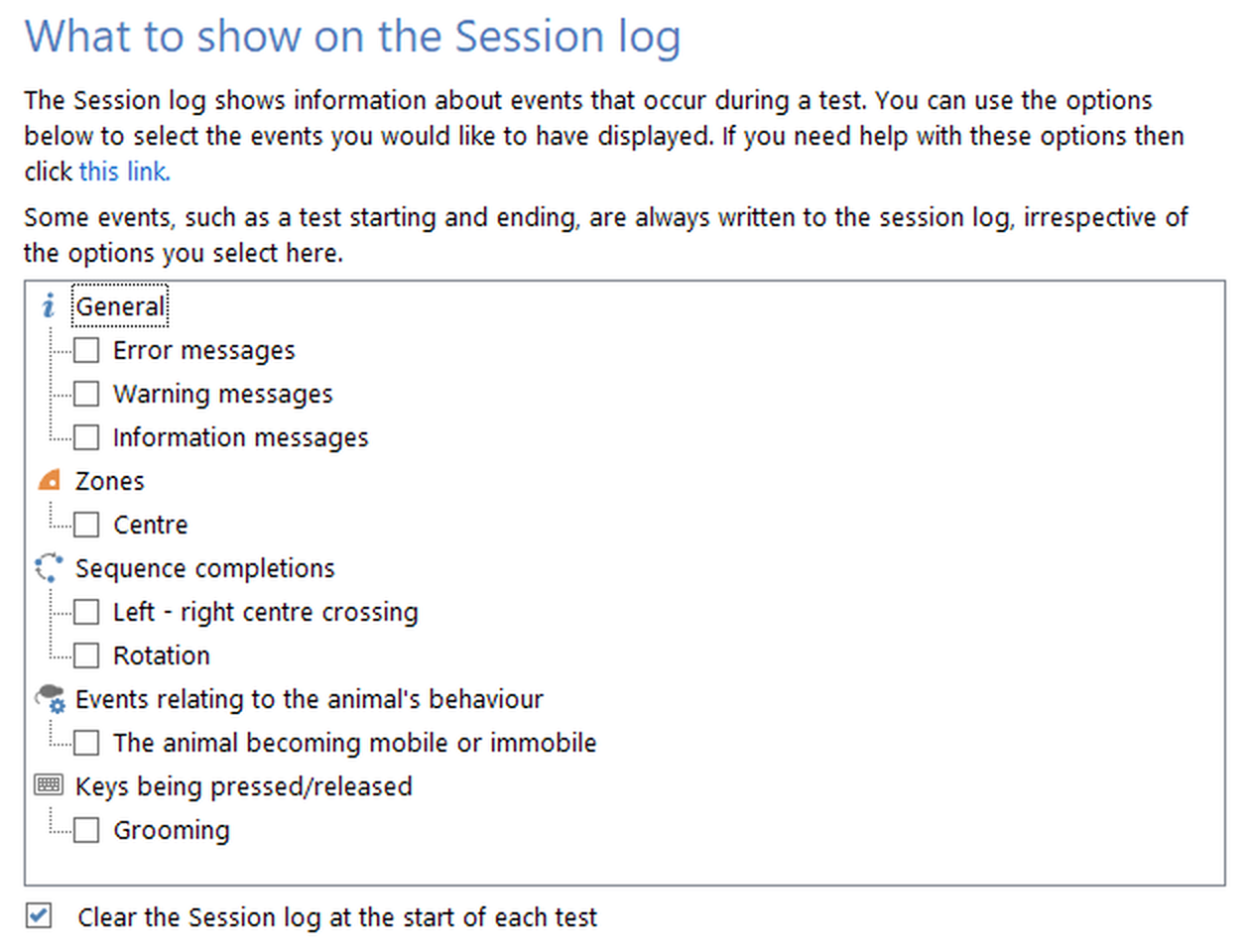
Figure 2. The 'What to show on the Session log panel' settings. By default, nothing is selected - so only test control events will be logged.
Test control events are always included on the Session log panel - i.e about the test being prepared (indicating which animal is about to be tested) and the starting and stopping of the test. By default, this is all that's included on this panel - but you can use these Session log panel settings to add in other events that you might be interested in seeing.
For example, you may be interested in noting when during the test the animal enters and leaves a certain zone - in which case, just find the zone in this list, and check the box.
Note: The settings here are also available by clicking the  button on the Session log panel itself.
What you can show on the Session log panel
The following list outlines the information that will be shown on the Session log panel when you select an item of that type in the list:
| Zone | Animal enters zone |
Animal starts investigating zone
| Key | Key pressed / released |
| Sequence | Sequence completed |
| Virtual Switch | Switch becomes active / inactive |
| Freezing | Freezing starts / stops (*) |
| Immobility | Immobility starts / stops |
| Rearing | Rearing starts / stops |
| On/off inputs | On/off input activated/deactivated |
| Rotary encoder | Clockwise / anticlockwise rotation completed |
| Movement detector | Movement detector - animal goes mobile / immobile |
| On/off output | Output turned on/off |
Output changed from continuous to pulse train
Pulse train frequency, duty cycle or duration changed.
| Speaker | Speaker source changed |
Speaker started or stopped
Volume, frequency, or duration changed.
Speaker reached the end of the file
'Repeat at end of file' setting changed.
| Temperature controller | Programmed temperature changed |
Ramp duration changed
Ramping started or ended
| Light controller | Light controller turned on/off |
Programmed light level changed
Ramp duration changed
Ramping started or ended
| Syringe pump | Syringe pump started / stopped / stalled |
Target volume changed or cleared
Flow rate changed
Direction changed
| Shocker | Shocker activated / deactivated |
Intensity or duration changed
| Laser controller | Laser controller turned on/off |
Source changed (continuous / pulse train / pulse file)
Pulse train frequency, duty cycle or duration changed.
Pulse file name changed.
| Selector | Selector value changed |
| Pellet dispenser | Pellet dispensed |
Clearing the Session log panel
You can leave the Session log panel logging events from one test to the next - but you'll probably find this an overload of information, and you only really need to see the events from the test that you've just finished running.
To help you see this information automatically, ANY-maze allows you to Clear the Session log panel at the start of each test. When a test starts, this will in fact clear away all the information from the previous test - thus leaving you with only the information relevant to the test that's currently running. So you'll still see the information about the preparation of the test, including which animal is being tested - but none of the events that occurred during the previous test.

© Copyright 2003-2026 Stoelting Co. All rights reserved
ANY-maze help topic T0580