ANY-maze Help > The ANY-maze reference > The Protocol page > The elements of a protocol > Reports > Track plots > Setting up a Track plot > Specifying the playback duration for a track plot
Specifying the playback duration for a track plot

In brief
When a track plot is played the track is 'left behind', so the longer playback lasts the more track is actually displayed. For short tests this is usually quite desirable, as it helps you see where in the apparatus the animal has been, but in longer tests it can make the playback almost unusable as the track continuously overlays itself.
The solution to this is to limit how long the track is shown for during playback. For example, if it is only shown for 30s then there will be a 'tail' behind the animal's position that stretches back 30s. This 'tail' means you can still see where the animal has recently been, but as time passes so the far end of this 'tail' will be removed, preventing the track from building up over time.
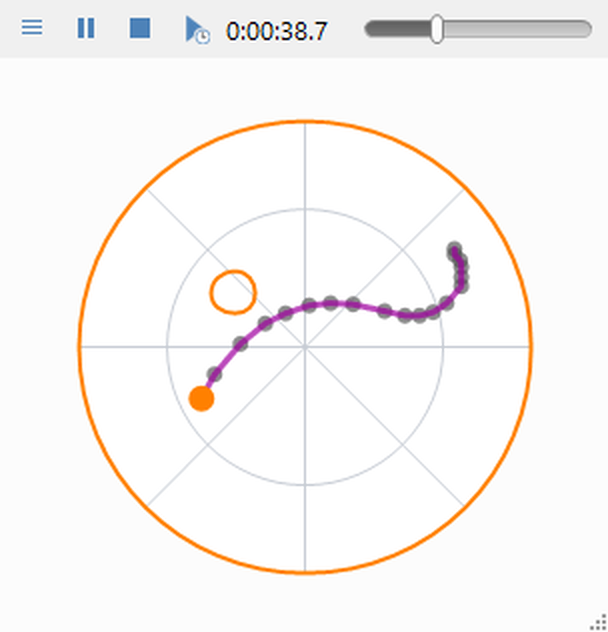
Figure 1. In this track plot, the playback duration is just 4s, so the track just shows where the animal has been in the last 4s.
Details
If you want to limit the playback duration of a track plot, you should select the appropriate option at the bottom of the settings pane. You will then need to enter the actual duration to use, which can be any time from 0s to 1 hour. You can enter the time using any combination of units: s for seconds, m for minutes and h for hours, for example '1m 30s'.
Note that markers are also only shown for the specified duration.

© Copyright 2003-2026 Stoelting Co. All rights reserved
ANY-maze help topic T0685