ANY-maze Help > The ANY-maze reference > The Tests page > Recording and tracking with videos > Recording videos of tests
Recording videos of tests

Introduction
There are two distinct ways of recording videos of tests - you can record a video manually or you can set up the protocol so that ANY-maze will automatically record a video of all the tests in an experiment.
Automatically recording tests
If you know in advance that you will want to record videos of the tests in an experiment then you should set up the protocol so that the videos are recorded automatically - see What to record while testing. Automatically recording tests in this way has a number of advantages:
| • | You don't need to remember to start recording - it occurs automatically when the test starts. |
| • | You can use procedures to actually control the video recorder during the test - for example you could pause the recorder while the animal's asleep. |
| • | ANY-maze will include a link to the test's video in the list of Related reports for the test - thus when you are viewing any test specific report, the video will just be a click away. |
| • | ANY-maze will file the videos automatically for you, so you won't have to give them file names and choose where to save them. |
You'll find more information about automatic recording of tests in the What to record while testing topic.
Manually recording tests
In some cases you may wish to record a video manually - this is most useful when you don't actually want to track the test at the time, instead you want to record a video and then perform the tracking later.
There are two places in ANY-maze where you can record a video, on the Tests page and on the Video page. Neither of these is any better than the other, the only difference is that you can record on the Video page without having to create an experiment first - so if you just want to record a video this the easiest place to do it. On the other hand, if you're already running an experiment and you decide that you'd like to record a video then you'll already be on the Tests page and recording it there will be more logical.
Whether you're recording a video on the Tests or the Video page the method used is the same - you use the VCR buttons shown at the top of the page:
 Record Record | Opens a window where you can specify the file to record to (see below) and then starts recording. |
 Pause Pause | Pauses a recording. |
 Stop Stop | Ends a recording. |
 Cancel Cancel | Cancels a recording - any video that's been recorded will be thrown away. |
 Add label Add label | Opens the Add label window where you can enter some text which will be used to label the video at the moment you clicked the button. During playback, you will be able to select the label and jump directly to that point in the video. |
 | If you are recording on the Video page and you then switch to another page (such as the Protocol or Tests) the video recording will stop. This doesn't happen if you record a video on the Tests page. In general this is less of a problem than it sounds because when recording on the Video page you usually won't have an experiment open - in which case all the other pages will be disabled, so you won't actually be able to switch to them. |
Specifying the file to record to
When you manually record a video you will need to specify the name of the file you want the video to be recorded to. You do this using the Video recorder window
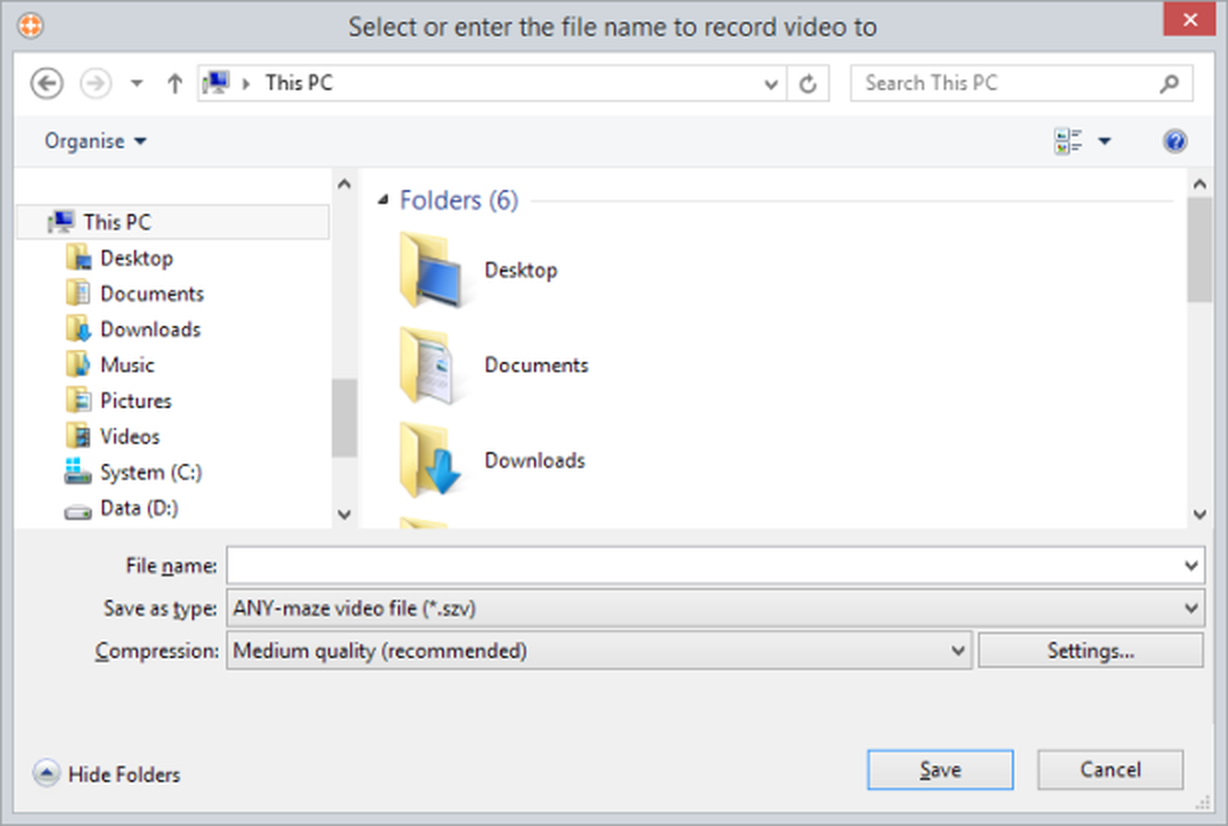
Figure 1. The Video recorder window.
| Files list | The files list shows the folders and files of the selected format (see Type of file below) stored in the current location. You can double click a folder to open it and you can click a file to transfer its name to the File name field. |
| File name | Use this field to enter a name for the video you're going to record. You can enter up 255 characters but your entry mustn't contain any of the following characters: \ / : * ? " < > |. |
| Type of file | There's only one choice here ANY-maze video file so you can ignore this list. |
| Compression | You can choose one of three standard compression schemes for the video: Best quality, Medium quality or Low quality or a scheme you've saved previously using the options on the ANY-maze video recorder settings window. |
If you're not sure which scheme to use I suggest you select Medium quality which is fine for most situations.
| Settings | Clicking this button will open the ANY-maze video recorder settings window where you can fine tune the video compression settings ANY-maze will use to record the video. See the ANY-maze video recorder settings window topic for more details. |
Appending recordings to existing video files
If you choose to record to a file that already exists, the system will ask you whether you want to append the new recording to the end of the existing file, or replace the file with the new video. By appending recordings you can easily build up a single file which contains a series of different tests. By the way, the system will automatically include a label in the video to mark each point where you appended a new recording.

© Copyright 2003-2026 Stoelting Co. All rights reserved
ANY-maze help topic T0827