ANY-maze Help > Using ANY-maze > Running an experiment > Recording data about animals and tests
Recording data about animals and tests

As you may know, ANY-maze allows you to define fields which you can use to record additional information about your animals or tests. For example, you might define a field to record the animals' sex or a field to record the light level in each test.
If your protocol includes any such fields, then you will be able to record the actual data in the Animal details report or Test details report which can be accessed by clicking the animal or test numbers, respectively, in the Test schedule report.
Using the Animal treatments and data table
In fact, there's an even easier way to enter data about all your animals, which is to switch back to the Experiment page and select the  View animals button. This will cause the animals table to be shown.
The advantage of the animals table is that you can enter all the data for all the animals on a single page - see figure 1.
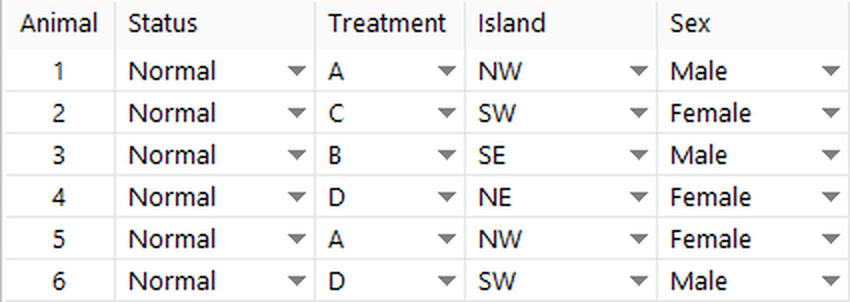
Figure 1. The Animals table provides a convenient location to enter data about all the animals in an experiment.
As you can see in the above figure, this table can be used to:
| • | Enter the treatment code of the treatment which each animal is to receive. |
| • | Specify the position of any movable zones whose positions vary between (but not within) animals. |
| • | To enter the values for any fields which are defined in the protocol such as the animal's sex. Remember you can use fields as independent variables in statistical analysis. |
You can change any information in the table at any time whether before, during or after the experiment is performed.
 | Hint: If you want to work down a column in this table, then you'll probably find it easiest if pressing the Enter (or Return) key on your keyboard moves down to the cell below. However, if you want to work across the table, entering all the data for a single animal, then you'll find it easier if the Enter key moves to the cell to the right. In fact, you can choose how the Enter key works - just right click over the table and choose the appropriate option from the menu which appears. |

© Copyright 2003-2026 Stoelting Co. All rights reserved
ANY-maze help topic T0043