ANY-maze Help > I/O devices supported by ANY-maze > The ANY-maze interface device family > The ANY-maze Analogue interface > Configuring an ANY-maze Analogue interface
Configuring an ANY-maze Analogue interface

Introduction
The ANY-maze Analogue interface configuration window is primarily used to configure the individual ports of the device; however it also shows information about your device, and allows you to change its ID and update its firmware.
| • | Accessing the ANY-maze Analogue interface configuration window |
| • | Configuring the input ports of the ANY-maze Analogue interface |
| • | Suppressing the LED on the ANY-maze Analogue interface front panel |
| • | Changing the device ID |
| • | Updating the device firmware |
Accessing the ANY-maze Analogue interface configuration window
To access the ANY-maze Analogue interface configuration window, select your ANY-maze Analogue interface in the list on the left side of the I/O page and then click the  Configure this device button in the ribbon bar.
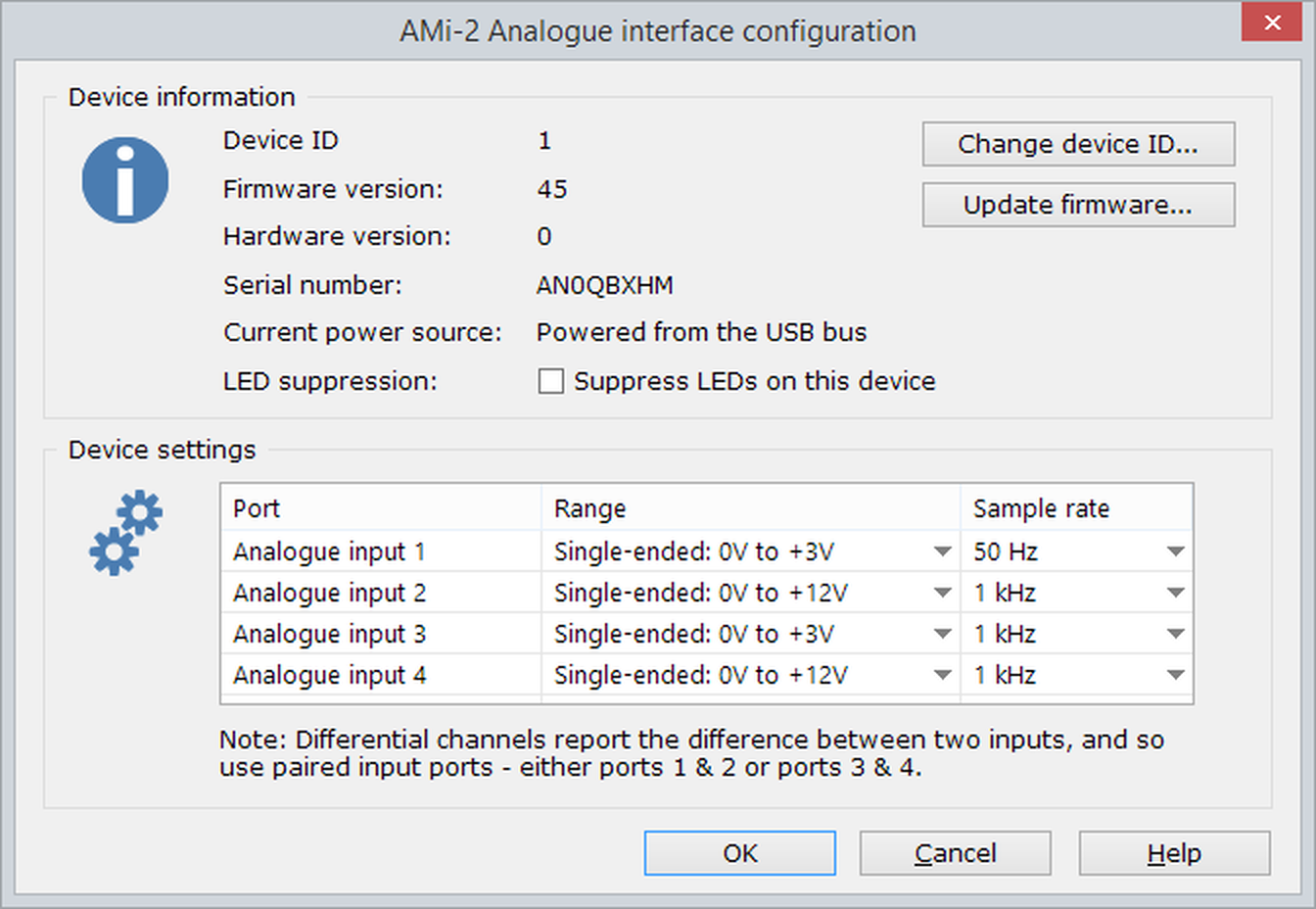
Figure 1. The ANY-maze Analogue interface configuration window.
Configuring the input ports of the ANY-maze Analogue interface
The ANY-maze Analogue interface has four input ports, each of which can be independently configured. Specifically, you can set the voltage range that the port can read and the frequency at which the incoming signal will be sampled - see figure 2, below.

Figure 2. Each of the Analogue input ports can have its range and sampling rate independently configured.
Setting the range
How you configure a port will depend on the signal you intend to connect to it. First of all, you should set the range to be the smallest that will cover all the values you anticipate the input could have. For example, imagine you are connecting to a respiratory gas analyser that outputs a signal from 0V (representing 0% CO2) to 5V (representing 100% CO2). The range of values you expect is from 0V to 5V, so you should set the input to have a range of 0V to 6V, as that's the smallest range which covers all the expected values.
If you set the range so it's too small (perhaps in the above example you set it to be 0V to 3V), then you won't damage the ANY-maze Analogue interface, but if the signal goes above 3V it'll just be reported as 'maximum', so ANY-maze won't be able to tell whether it's 3V, 4V or 5V.
There are three 'single-ended' ranges available: 0-3V, 0-6V and 0-12V. These are all referenced to ground, that's to say that the signal is on one wire coming into the device and the other wire is ground (0V), so if the voltage on the signal wire is 2V greater than ground then the signal input is considered to be 2V. I know, this sounds pretty obvious! However, there are also three 'differential' ranges available: -3 to +3V, -6V to +6V and -12V to +12V. These are not referenced to ground, rather complementary signals are on both the wires coming into the interface, and the signal's value is the difference between the voltage on the wires. So, for example, if one wire has a voltage of 2.5V and the other has a voltage of -2.5V, then the signal is the difference, so 5V in this case (or perhaps -5V, depending which of the two inputs we consider to be positive and which negative).
This 'differential' input seems much more complicated than the 'single-ended' input, but it has a big advantage - it's far less sensitive to electromagnetic interference (noise). For example, imagine that something in the lab is generating noise that interferes with the signal as it passes down the wires from your equipment and into the ANY-maze Analogue interface. With a single-ended input, this noise might make the signal change from 2.5V to 3V (i.e. it adds 0.5V) and so you'll get an erroneous reading. However with a differential input, where the signal would have been 2.5V and -2.5V, the noise will affect both wires equally - i.e. it will add 0.5V to both, making them 3V and -2V. However the difference is still the same (5V), and so the reading will be unaffected.
Because the differential ranges have in effect two signals, they use two of the ports on the ANY-maze Analogue interface - for example, if you set the range of Port 1 to be Differential: -6V to +6V then Port 2 will automatically change to the same range (and you will connect the differential wires to the signal pins of ports 1 and 2).
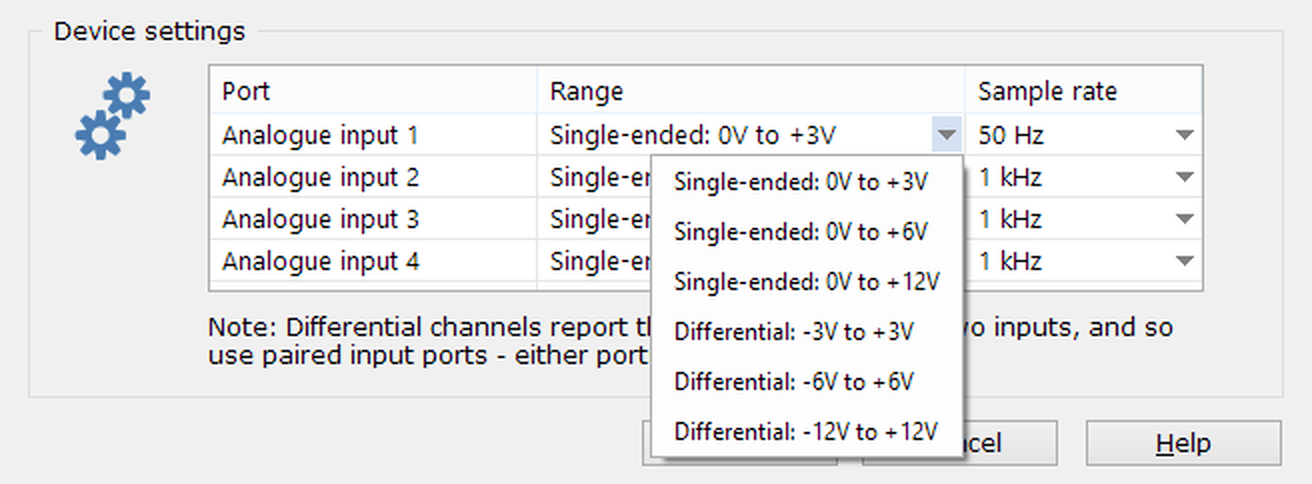
Figure 3. The Analogue input ports support six different ranges.
You should use the differential ranges when the device that is outputting the signal outputs a differential signal. You can also use them with a single-ended signal that might be negative, for example, the signal is referenced to ground but could range from -2V (i.e. 2V below ground) to +2V. In this case, you would connect ground to the negative input and the signal to the positive input, and select the -3V to +3V differential range. You won't get the noise immunity benefits of a differential signal, but the interface will correctly read the signal across its entire range of -2V to +2V (if you used a single-ended range, then whenever the signal goes negative it would simply be reported as 0V).
Setting the sampling rate
The other thing you can configure for each port is the sampling rate. The ports support seven sampling rates from 1Hz up to 1kHz. You should use the lowest rate that will allow you to detect the expected changes in the signal. For example, in the case of a respiratory gas analyser, the gas levels are not likely to change very quickly - so you might choose a rate of 10Hz (i.e. the interface will report the signal's value 10 times per second). If, on the other hand, you were connecting to an EEG signal then the signal could be changing very quickly, and you would probably want to select a sampling rate of 500Hz or 1kHz. Of course you could just choose a rate of 1kHz all the time; this would work, but it means that ANY-maze would be recording 1000 values every second throughout the test, and this could make your experiment file quite large. That said, if in doubt it's better to err on the higher side (i.e. to choose a higher sampling rate than you might actually need) as this will always give you the data you require, whereas if the rate is too low, you might miss a relevant change in the signal.

Figure 4. The Analogue input ports support seven different sampling rates.
Suppressing the LED on the ANY-maze Analogue interface front panel
The ANY-maze Analogue interface has an LED on the front panel which shows the status of the device; red when connected to the PC and green when communicating with ANY-maze.
If the interface will be visible to the animal during a test, then you may wish to suppress this LED - perhaps the test should be performed in darkness, or perhaps you're concerned that the LED could provide visual cues to the animal. To suppress the LED, you simply need to check the Suppress LEDs on this device button in the Device information section of the configuration window.
Changing the device ID
The method of changing the device ID is the same for all ANY-maze interface devices. Full details, including what the device ID is and why you might want to change it, can be found here.
Updating the device firmware
The process of updating the firmware is the same for all ANY-maze interface devices. Full details can be found here.
See also:
| • | Setting up the ANY-maze Analogue interface |
| • | Connecting the ANY-maze Analogue interface to your equipment and testing it |
| • | Using the ANY-maze Analogue interface in tests |

© Copyright 2003-2026 Stoelting Co. All rights reserved
ANY-maze help topic T1083