ANY-maze Help > The ANY-maze reference > The Protocol page > The elements of a protocol > Reports > Heat maps > Setting up a heat map > Specifying what to plot on a heat map > Heat map background settings > The Heat map colour set window
The Heat map colour set window

Introduction
The heat map colour set window, shown in figure 1, is used to define the colours in which a heat map is drawn. In essence you just need to specify two colours, the 'coldest' colour and the 'hottest' colour. However, there are a number of things you need to take into consideration when choosing the colours to use.
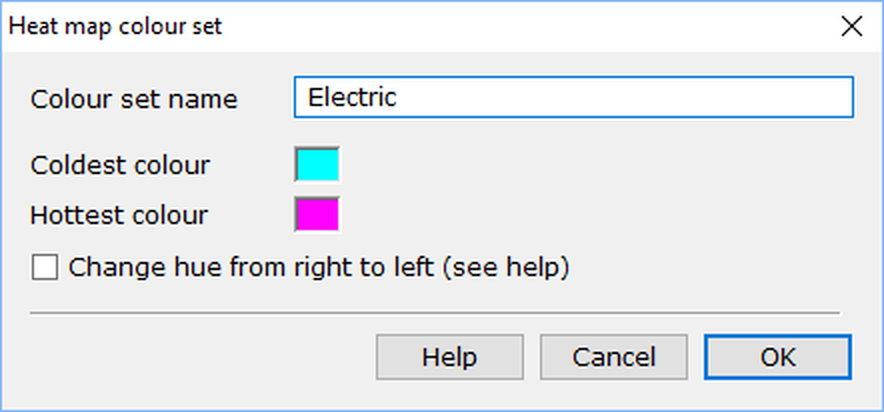
Figure 1. The Heat map colour set window.
Details
| Colour set name | You must give a colour set a name, but it can be anything you like up to a maximum of 64 characters. |
| Coldest colour | Click the colour box to open the standard Colour picker window (shown in figure 2, below). Here you should select the colour to use for the coldest areas of the heat map - i.e. the parts where the animal spent no time. There are some things to consider when choosing a colour, which are explained below. |
| Hottest colour | Click the colour box to open the standard Colour picker window. Here you should select the colour to use for the hottest areas of the heat map - i.e. the parts where the animal spent the most time. There are some things to consider when choosing a colour, which are explained below. |
| Change hue... | This option affects how ANY-maze uses the colours you choose; its action is explained below. |
Choosing the colours, and how they're used
In essence, all you are doing when you define a colour set is to choose the two colours at either end of the heat map scale - ANY-maze then draws the heat map using the colours between them. However, this implies that there is some set sequence that can be used to move from one colour to another.
If, rather than choosing two colours, we were choosing two numbers, then it would be fairly obvious that if the 'coldest' number was 4 and the hottest number was 22, then we'd have a heat map scale that would go something like, 4, 5, 6 ... 20, 21, 22. So what we want to do is create a similar sequence for colours, starting from our coldest colour (say, dark orange) and going up to our hottest colour (say, light green) - but what colours come between them? Well, the rainbow provides a well-known ordered sequence for colours that goes red, orange, yellow, green, blue, indigo, violet. So we could say that in our example (moving from dark orange to light green) the colours would go: orange, yellow, green. And if we start with dark orange and end with light green, we could also say that we'll start with a dark colour and get progressively lighter. And in essence that's what ANY-maze does.
In the world of computers, colours are often defined as a mix of the primary colours Red, Green and Blue (usually referred to as RGB). But there's another, less well known way to define colours, which is based on their Hue, Saturation and Lightness (or HSL). Here, Hue is the colour itself (such as orange or green), Saturation is how much of the colour we have (so no saturation is grey and full saturation is very orange or very green) and Lightness (also sometimes called luminance) is how bright the colour is (so low lightness is a dark orange and high lightness is a pale orange). In fact, you'll see a colour's HSL values in the colour picker window which ANY-maze uses - see figure 2, below.
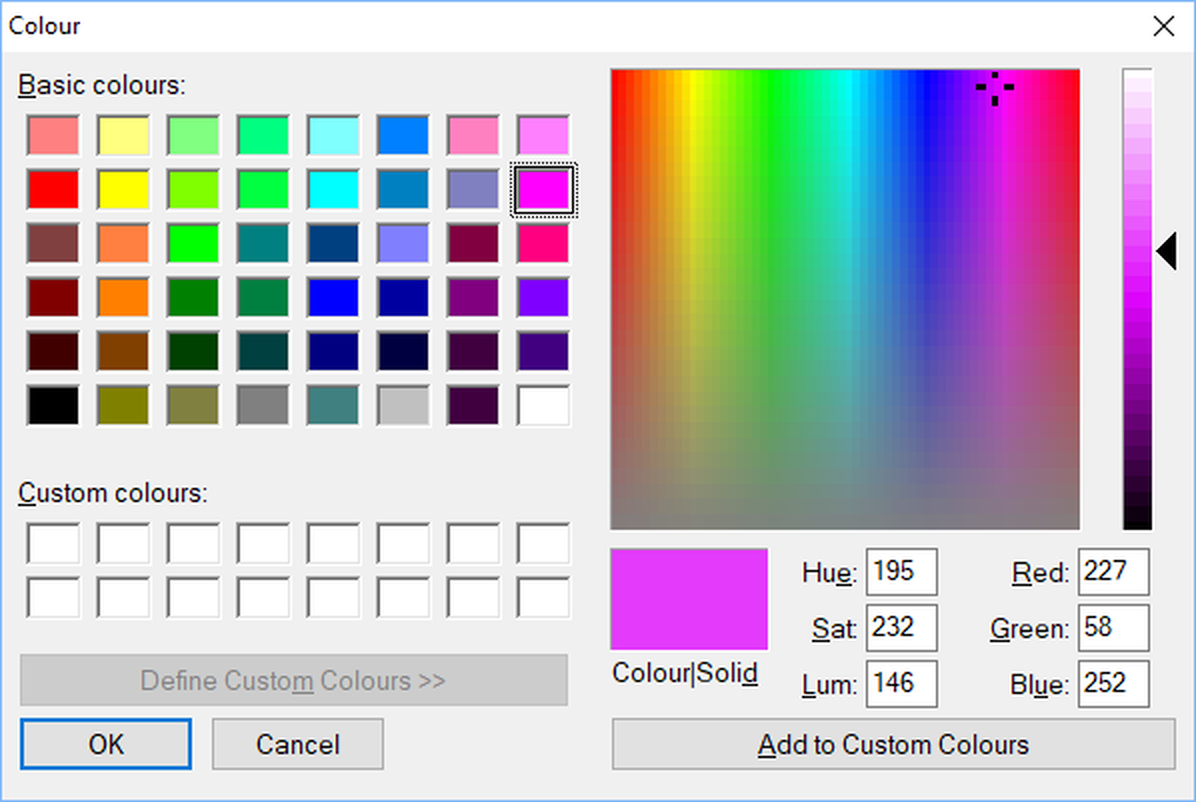
Figure 2. The colour picker window. The values for a colour's hue, saturation and lightness (or luminance) are shown just below the colour square.
When you use the colour picker, you are actually using HSL without really knowing it. The colourful square shows different Hues going from side to side, and different saturations going from bottom to top. And the rectangle to the right of the square has different lightness going from bottom to top.
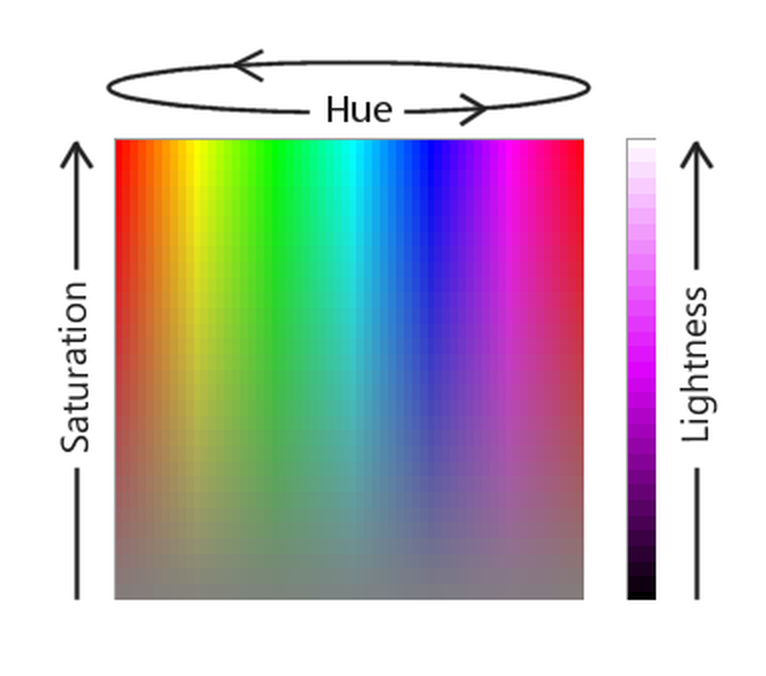
Figure 3. Using the colour picker window, you define a colour by setting its Hue, Saturation and Lightness.
Getting back to our heat map colours, we have a cold colour (dark orange in my example) and a hot colour (light green) and the challenge is to decide what colours come in between. You're probably starting to see the answer. If we break the colours down into their HSL values then we can move in sequence from the cold colour's hue to the hot colour's hue (effectively moving across the colourful square in the colour picker window). In the same way, we can also move from the cold colour's saturation value to the hot colour's saturation value, and we can do the same for lightness; so now we have a way to define what other colours come between the two colours you choose.
What ANY-maze actually does is to create 250 colours between the cold and hot colours you select. For each colour, it works out new hue, saturation and lightness values, being the values between the cold and the hot colours. For example, if the cold colour had a hue of 20 and the hot colour had a hue of 80 then the 125th colour (i.e. the one in the middle) would have a hue of 50 (half way between 20 and 80). Similarly if the cold colour had a lightness value of 80 and the hot colour had a lightness value of 100 then the 125th colour would have a lightness value of 90, and let's say that the cold and hot colours have the same saturation value of 200, so the 125th colour will also have saturation of 200. So the 125th colour would be H=50, S=200, L=90 which is a slightly muddy green!
Hopefully this all seems reasonably logical and you're now understanding how ANY-maze creates a sequence of colours for the heat map using the cold and hot colours that you choose. However, there are a couple of additional things you need to be aware of:
| 1. | Although you can select any colours for hot and cold, it's usually best to choose colours which have at least part of their HSL value the same. For example, you might fix Hue and Saturation and just choose two colours with different Lightness values - this might create a heat map where cold is, for example, a dark red and hot is a very pale red. |
| 2. | In fact, you'll usually want to change the hue as that's what makes the contrast in the heat map standout most clearly. The sequence of hue is not as obvious as saturation or lightness, as hue moves through the colours of the rainbow, whereas saturation and lightness simply start low and become greater. In fact, hue has another difference too: it cycles round, so the first hue value (red) is the same as the last one - think of the colours being wrapped around a cylinder; as you turn the cylinder, you get to see different colours, but there's no start or end - they just progress smoothly through all the colours. This means that you could, for example, have a start hue that is blue (which has a value of 160) an end hue that is yellow (which has a value of 40) and ANY-maze would work through the hues from 160 to 240 (the maximum value) and then restart at 0 and continue up to 40. So the colours would go from blue though purple to red then orange and finally yellow. But, you could go the other way through the hues (like turning our cylinder of colours in the opposite direction), in which case we'd move from blue to cyan to green to yellow. This is the option that's provided by the check box labelled Change hue from right to left, where the term 'right-to-left' comes from the sequence that the hues are shown in the colourful square in the colour picker window. |

© Copyright 2003-2026 Stoelting Co. All rights reserved
ANY-maze help topic T0694