ANY-maze Help > The ANY-maze reference > The Options page > Managing users in ANY-maze > Logging on
Logging on

Overview
Before you can start using ANY-maze, you may need to identify yourself to the system. You do this by simply selecting your name from a list of ANY-maze users and, if required, entering your password - see figure 1.
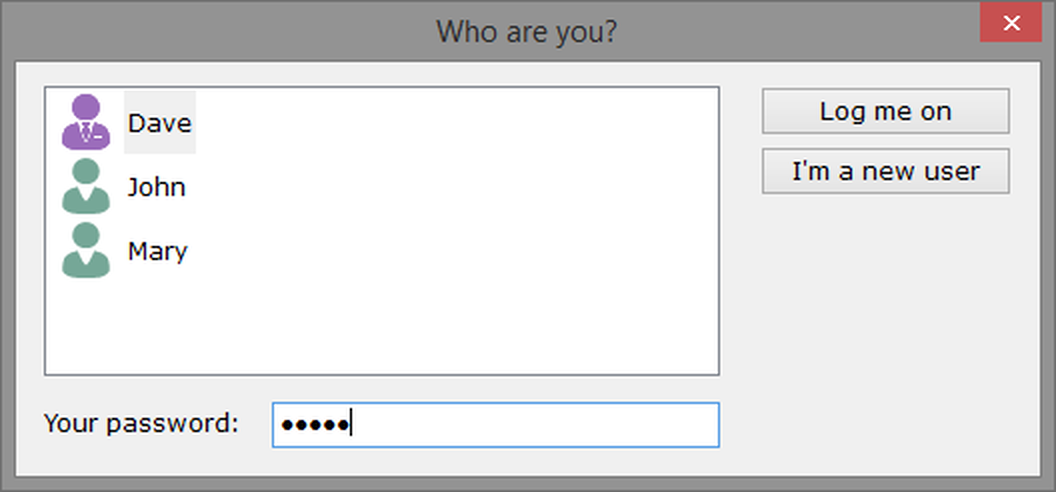
Figure 1. The ANY-maze log-on window.
Details
 | If you click the close button on this window, then ANY-maze will close. |
 | If your account doesn't have a password, then you can log on most quickly by simply double clicking your name in the list of users. |
| The user list | This list shows all the users currently registered with the system. Administrators, such as Dave in the above figure, are shown with a purple coloured image. |
If your name is not included in this list, then you've not been set up as a user on this copy of ANY-maze. However, depending on how the user policies have been set, you may be able to do this yourself. If you can see a button labelled I'm a new user, then clicking it will allow you to create your own ANY-maze user account. If this button is not shown, then you'll need to ask the ANY-maze administrator to create a user account for you.
| Your password | If your user account is protected with a password, then you should enter it into this field. You won't need to enter a password if the ANY-maze user policies don't require passwords, and you haven't entered one on your account. If you enter an incorrect password, then ANY-maze will wait a few seconds before you can try again - each time you fail to enter the correct password, this delay will double. This is a security feature which makes it hard for someone to try guessing your password. NOTE: PASSWORDS ARE CASE-SENSITIVE. |
| Log me on | Once you've selected your name in the list, and entered your password (if required), then clicking the Log me on button will give you access to ANY-maze. |
| I'm a new user | This button will only be present if the user policies have been set to allow new users to create their own accounts. Clicking it will open a window where you can add yourself to the list of users registered with ANY-maze, by entering your name and specifying a password. |
After logging on, you can log off at any time by selecting the File page and clicking the Log off option. This will re-open this Log-on window, for the next user to log on.
See also:
| • | An introduction to ANY-maze user management |
| • | ANY-maze user management - this explains how to set user policies |
| • | Editing your user name and password |
| • | Setting user passwords as a result of a policy change |
| • | Self-registration of new users |

© Copyright 2003-2026 Stoelting Co. All rights reserved
ANY-maze help topic T0951