ANY-maze Help > I/O devices supported by ANY-maze > The ANY-maze Operant interfaces > A tutorial on the ANY-maze Operant interface > Operant interface tutorial : Creating the experiment
Operant interface tutorial : Creating the experiment

Introduction
Having set up a protocol for your ANY-maze Operant interface, you are now ready to use it in an experiment. In this topic we'll create a very simple experiment, run a test and take a quick look at some of the results. Clearly a 'real' experiment would be more sophisticated, but you should find it easy to build on the basic experiment described here.
| • | Creating the experiment and loading the Operant protocol |
| • | Adding some treatments and animals |
| • | Specifying the animals' treatments |
| • | Performing a test |
| • | Viewing the test results |
Creating the experiment and loading the Operant protocol
If you have just completed the steps in Operant interface tutorial : Setting up your protocol, then you won't need to do anything here, as you will already have an experiment open which will contain the Operant protocol. Otherwise, you will need to do the following:
| 1. | Switch to the File page. |
| 2. | If there's currently a file open, then select New experiment in the list on the left side of the page (otherwise, just move on to the next step). |
| 3. | The right side of the page will show a list of 'documents', one titled New empty experiment and others with the names of the protocols you have recently used. |
| 4. | Click the 'document' for the Operant protocol you saved earlier (if you didn't save a protocol earlier, then you'll need to go back and set up a protocol for your ANY-maze Operant interface and save the protocol at the end). |
Adding some treatments and animals
With the Operant protocol loaded, you can add the treatment groups and animals for your experiment. We're going to add just two groups with 2 animals each, but of course you could set up a more sophisticated experiment.
| 1. | Switch to the Experiment page. |
| 2. | On the right-hand side of the page, enter a treatment of 'Drug' with an 'N' of 2, and a treatment of 'Saline', also with an 'N' of 2 - as in figure 1, below. |
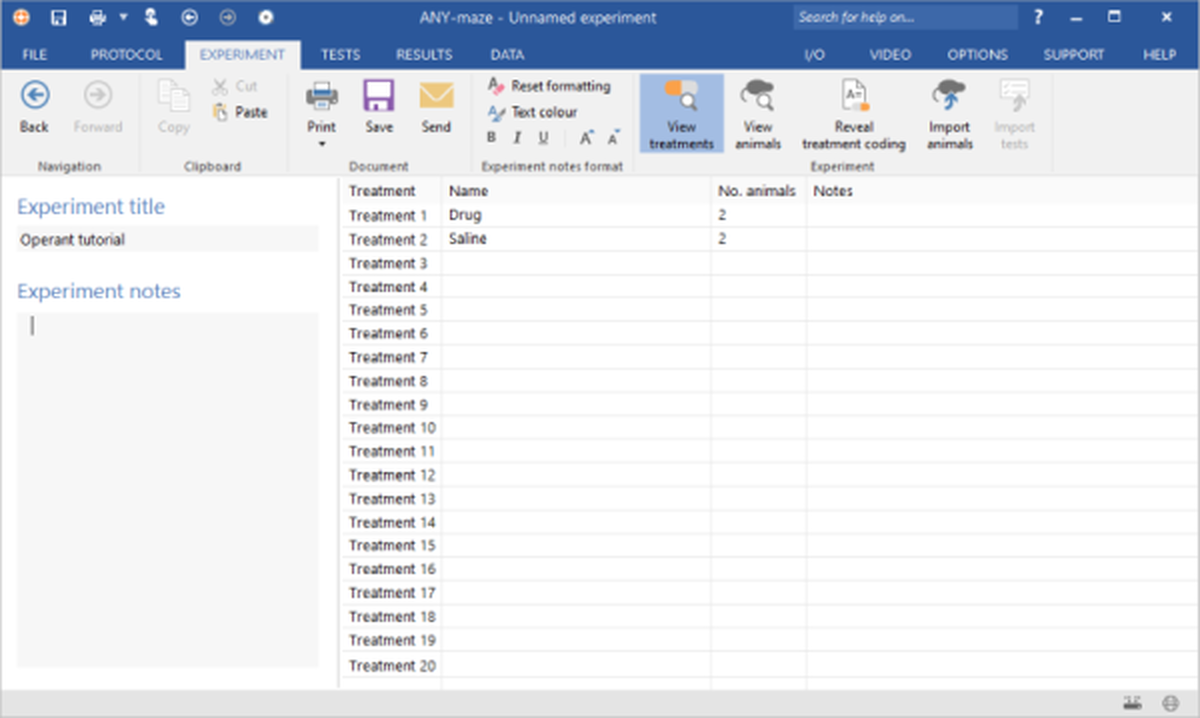
Figure 1. The 'Treatments' section of the Experiment page is used to add treatment groups to an experiment.
Specify the animals' treatments
Although in the previous step you will have specified the different treatment groups that your experiment will include, and the number of animals within each group, this doesn't actually tell ANY-maze which animal should be given which treatment - for example, Animal 1 should have which treatment - the first one? And animal 2, the first treatment too?
So, the next thing you need to do is specify which treatment each animal should receive. In fact, as well entering the animal's treatments, you can at the same time specify other information about them, such as their weight or sex - this depends on whether you included any Fields when you set up your protocol.
To enter the data about the animals' treatments, you should:
| 1. | Remain on the Experiment page. |
| 2. | Click the  View animals button in the ribbon bar. View animals button in the ribbon bar. |
| 3. | The page will change to show details of the animals - see figure 2 |
| 4. | If you've been following this tutorial so far, you'll see that the animals already have treatments allocated (because we set up our treatment groups to randomly assign the treatments). If not, then you can enter them here (along with any additional data) into the spreadsheet cells. |
| 5. | If you want to view the treatments again, just click the  View treatments button View treatments button |
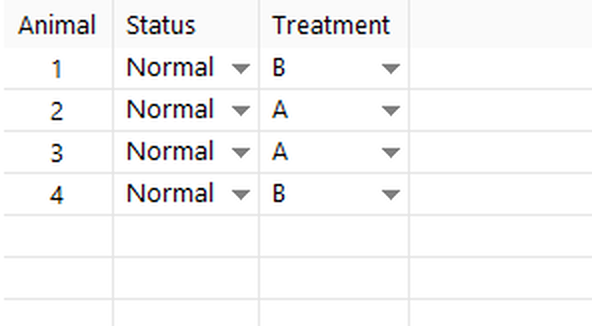
Figure 2. The 'Animals' spreadsheet, where treatments have been allocated.
When entering the animals' treatments, you need to specify the treatment code. This is because by default, ANY-maze performs experiments blind, so you don't know which treatment is which. Of course someone has to know this, and you can find out what the treatment codes are by clicking the  Reveal treatment coding button in the ribbon bar.
What next?
Now that you've created your experiment, you're ready to run some tests.
See also:
| • | Setting up treatment groups and animals |
| • | Treatment group coding |
| • | Assigning animals to treatment groups |
| • | Unassigned animals |
| • | Editing and deleting treatment groups |

© Copyright 2003-2026 Stoelting Co. All rights reserved
ANY-maze help topic T1100