ANY-maze Help > I/O devices supported by ANY-maze > Legacy I/O devices > The ANY-maze interface (AMi) > The AMi ports > The AMi General Purpose I/O ports > Connecting touch switches to the GPIO ports
Connecting touch switches to the GPIO ports

Introduction
Touch switches are an AMi add-on which can be used to detect when the animal touches something conductive. The switch has two terminals which need to be connected to two conductive items that the animal will touch - typically, one is a grid floor and the other is the thing you wish to detect touches of; for example a water-bottle spout. In this case, when the animal licks the spout, the switch will register as closed (in this configuration a touch switch is sometimes called a lickometer).
Touch switches connect to AMi GPIO ports.
| • | Connecting a touch switch to AMi |
| • | Configuring a GPIO port for use with a touch switch |
Connecting a touch switch to AMi
A touch switch connects to a single AMi GPIO port. The switches are supplied with a connector already attached to their cable, so you need do nothing more than plug the cable into the port you wish to use. Of course, you will also need to connect the switch terminals to your apparatus, but how you do this will depend on the application - see figure 1 for an example.
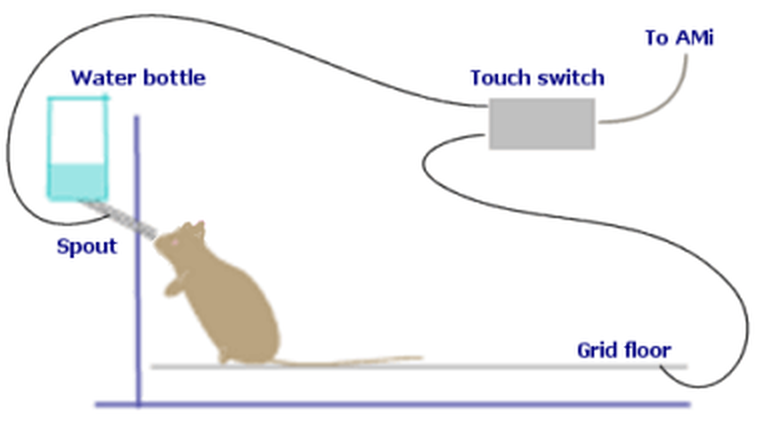
Figure 1. Using a touch switch as a 'lickometer'. When the animal licks the water-bottle spout, the switch will detect the touch of its tongue.
Configuring a GPIO port for use with a touch switch
Before you can actually use a touch switch, you need to configure the GPIO port to which it is connected as a 'touch switch port'. You can do this using the General Purpose I/O page of the AMi configuration window.

© Copyright 2003-2026 Stoelting Co. All rights reserved
ANY-maze help topic T1166