ANY-maze Help > I/O devices supported by ANY-maze > Other I/O devices supported by ANY-maze > Syringe pumps > Using syringe pumps with ANY-maze
Using syringe pumps with ANY-maze

Introduction
ANY-maze supports a number of syringe pumps from various manufacturers (see a full list here), and is not only able to start and stop the pumps but can also set their direction, rate and control the volume infused (or withdrawn).
| • | Connecting a pump to your computer |
| • | Telling ANY-maze where the pump is connected |
| • | Connecting multiple pumps in a chain |
| • | Testing pumps |
| • | Using a pump in an experiment |
Connecting a pump to your computer
Clearly, if ANY-maze is going to control a syringe pump, it needs to be connected to your computer and all the pumps that ANY-maze supports connect to a 'serial port'. In fact, serial ports are rather old technology and almost no modern computers include them! However, USB to serial port cables are easily found (a Google search will find a good number) and most syringe pump manufacturers also supply them. Alternatively we can supply one; just contact ANY-maze Support.
Although pumps connect to a serial port, many of them don't use standard serial port connectors, but instead use what looks rather like a telephone connector. This means that you need another adaptor, this time to convert from the serial cable to this telephone-style connector. This is something that the pump's manufacturer will definitely be able to provide.
Some of the more modern pumps on the market, for example, the Harvard PhD Ultra, connect to the PC directly using a USB cable. This gives the impression that the pump is not connecting via a 'serial port', so you may think it won't work with ANY-maze. In fact these pumps have a USB to serial converter inside the pump and, from the computer's point of view, the pump is still connecting to a serial port (and so still works with ANY-maze and still needs to be set up in the way described below).
Telling ANY-maze where the pump is connected
Unlike USB ports, which 'just know' what's connected to them, serial ports have to be told what they are connected to. In ANY-maze this is done using the I/O device set up window - follow the link for full details, but in brief, what you will do here is select the port to which the pump is connected (for example COM3) and then select the type of pump that's connected to the port, for example a 'New Era NE-1000'.
Connecting multiple pumps in a chain
Many pumps support a feature called a pump chain. Essentially, this allows you to connect multiple pumps to a single serial port by 'daisy-chaining' from one pump to the next. So the first pump connects to the serial port, the second pump connects to the first, the third connects to the second, and so on. Pumps that support this feature often allow you to create very long chains (up to 100 pumps), but ANY-maze only supports chains that are at most 16 pumps long. Also note that all the pumps in a chain must be of the same type.
For full details of whether your pump supports pump chains (and for instructions on exactly how to connect the pumps), refer to your pump's manual. Note that each pump in a chain requires a unique address, and you usually have to set this yourself using the pump's front panel controls - again, details will be in the manual.
You don't need to do anything in ANY-maze to use a pump chain; just connect the first pump in the chain to a serial port, tell ANY-maze that that's where the pump is connected (see previous section) and it will then automatically detect all the pumps in the chain (if it fails to do this, it probably means you have not set up the addresses correctly).
Testing pumps
When you first connect your pump (or pumps) to your computer, you'll almost certainly want to test them within ANY-maze before performing an actual experiment. Fortunately, this is very simple to do:
| 1. | Make sure you have connected the pump and told ANY-maze which port it is connected to (see previous sections). |
| 2. | Make sure the pump is switched on. |
| 3. | If you have a pump chain, make sure all the pumps on the chain are connected and that they are all switched on. |
| 4. | Start ANY-maze. |
| 5. | Switch to the I/O page by clicking on the I/O tab above the ribbon bar. |
| 6. | You should see an entry for your pump in the list on the left of the page. If your pump is not listed, check that you have specified the correct serial port (and pump) in the I/O device set-up window. Note that if you have a pump chain, only one pump will be listed. |
| 7. | Select the pump in the list and it will open to show a single sub-entry of Syringe pumps; click it. |
| 8. | On the right-hand side of the page, you will see a graphical representation of your pump. If you have a pump chain, you will see each pump in the chain shown individually. |
| 9. | Click on the pump graphic and the pump should start to infuse at 80% of its maximum speed. Click it again and the pump should stop. Try this for all the pumps you have connected. |
| 10. | Just to the left of the pump graphic is a panel with two tabs: Information and Settings. If you select the Settings tab, you can alter the pump's direction (assuming your pump supports both infuse and withdraw directions). You can change this while the pump is running, or you can stop the pump, alter the direction and then start it again. |
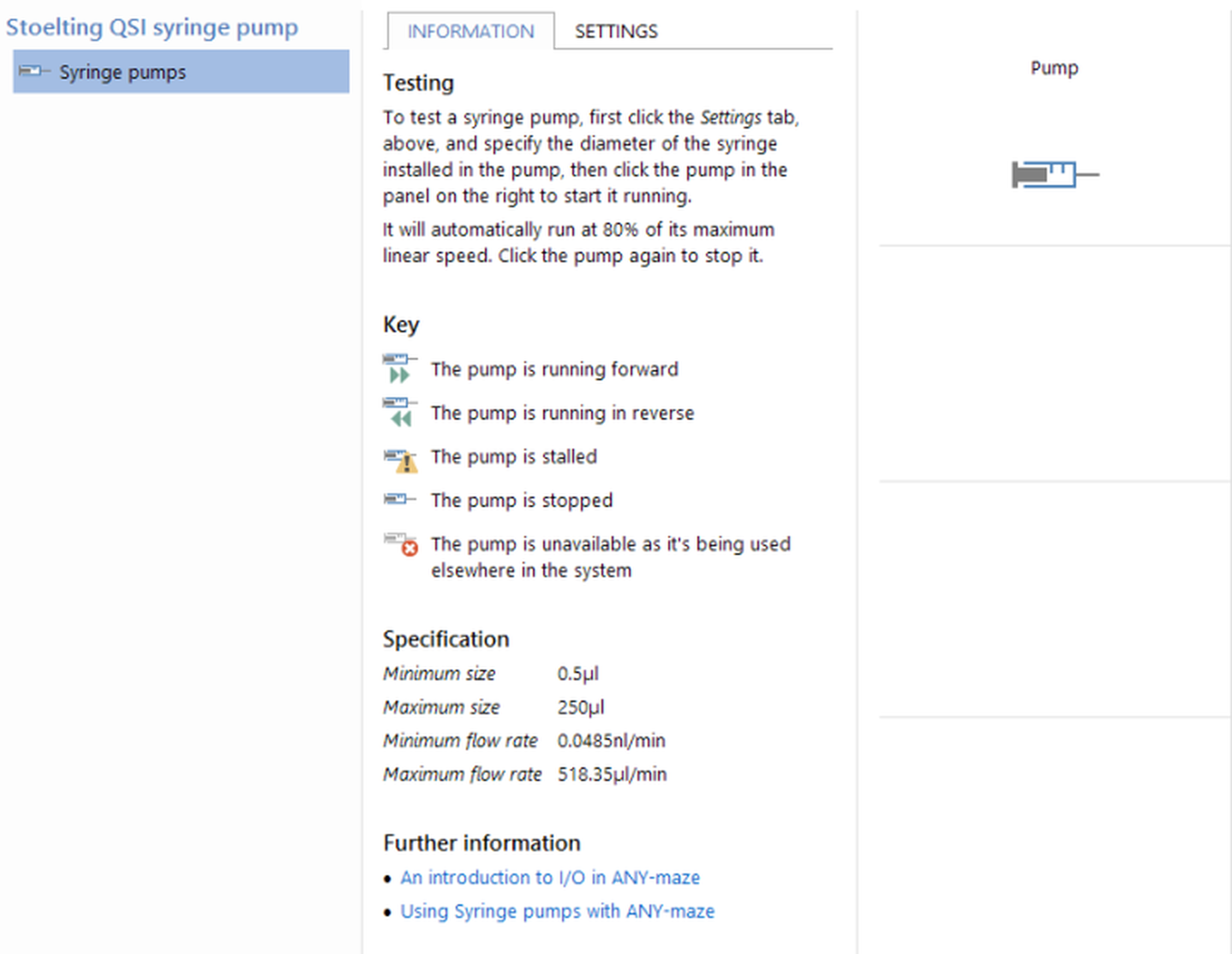
Figure 1. Testing a Stoelting QSI syringe pump on the I/O page.
These few simple tests will allow you to confirm that ANY-maze can detect your pumps and control them.
By the way, some pumps allow you to make changes using their front panel buttons while the pump is being controlled by a computer. However, if you do this then ANY-maze can get 'out of sync' with the pump. For example, if you use ANY-maze to set the pump to infuse and then you change the direction using the front panel buttons, then ANY-maze will think the pump is infusing when really it is withdrawing. The important point is:
 | Don't use the pump's front panel buttons to control a pump which is being controlled by ANY-maze. |
Using a pump in an experiment
ANY-maze cannot only start and stop a pump, but it can infuse (or withdraw) a specific volume at a specific rate and it can change the rate or volume while a test is running. For example, you might have some apparatus which you have divided into three zones, and you want to infuse a drug at a high rate when the animal is in one of the zones, at a lower rate when it's in another of the zones, and stop the infusion entirely when it is in the remaining zone; thus the animal will be able to control the rate of infusion simply by moving to different parts of the apparatus. Alternatively, you may want to alter the infusion rate over time, or alter the infusion volume based on, for example, how much food the animal has eaten... well, I'm sure you get the idea.
To actually use a pump in an experiment, you will first need to add a Syringe pump to your protocol. Full details on how to do this can be found here. When you add the pump, you will specify the rate and direction and, optionally, the volume (if you don't specify a volume then the pump will run at the specified rate until explicitly stopped). You can also specify whether the pump should start running when the test begins.
In some cases these options may be all you need, but if you want to alter the pump's settings during an experiment then you will need to use a procedure. Full details about procedures can be found by following the link, but in brief, a procedure can detect when some situation occurs in a test (a certain time has passed, the animal has entered a certain zone, etc.) and then perform some action - for example, starting or stopping a pump, changing the pump's direction, etc. Full details about the actions which can be performed on a pump can be found here.
See also:
| • | Syringe pumps supported by ANY-maze |
| • | Adding a syringe pump to the protocol |
| • | An introduction to procedures |
| • | Syringe pump actions available to procedures |
| • | Syringe pump actions (for use with the ANY-maze version 4 Events and actions system) |

© Copyright 2003-2026 Stoelting Co. All rights reserved
ANY-maze help topic T1284