ANY-maze Help > I/O devices supported by ANY-maze > The ANY-maze interface device family > The ANY-maze Optogenetics interface > Using the ANY-maze Optogenetics interface in tests
Using the ANY-maze Optogenetics interface in tests

Introduction
After configuring and connecting and testing your laser, you'll be ready to actually use it in some tests.
Adding the laser controller to the protocol
To use a laser in tests, you will need to add a laser controller to your protocol and select the port on the ANY-maze Optogenetics interface that the laser is connected to as the port to use.
As you set up the laser controller in the protocol you will be able to specify its frequency and duty cycle when activated, and optionally specify the duration for which it should remain active - see figure 1, below.
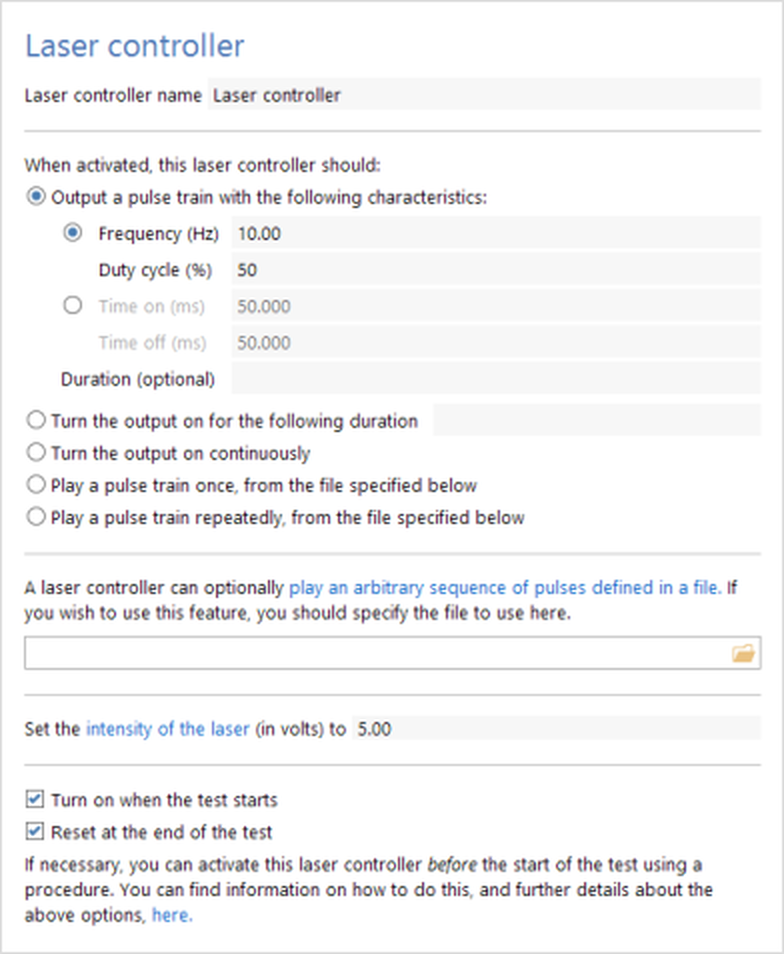
Figure 1. The laser controller settings in the protocol
If your laser supports changes to its intensity, then you will be able to set that too. However, this will still leave a key question unanswered: when should the laser actually switch on? In fact, you can specify that the laser should switch on when the test starts, but in most cases you'll probably want the laser to switch on when something happens in the test - for example, the animal enters a certain zone, or the animal presses a lever a certain number of times, or perhaps simply that 30 seconds of the test have elapsed. Anyhow, whatever the criteria, the method for determining that they're satisfied, and that the laser should therefore be activated, are the same - you will use a procedure.
Using procedures to control a laser during tests
Procedures are described in detail in the Introduction to procedures topic, and if you're new to procedures I suggest that you read this topic now.
While procedures are very flexible and can perform sophisticated processing, in most cases a very simple procedure is all that you need. For example, the procedure in figure 2 below will wait until the animal enters the 'Centre zone' and then activate the laser; it'll then wait until the animal leaves the zone and will deactivate it.

Figure 2. A simple procedure to activate a laser whenever the animal enters the Centre zone, and to deactivate it whenever it leaves the zone.
As can be seen in this example, Actions actually cause things to happen (in this case to switch the laser on or off) and there are a range of actions which can be performed on a laser controller. As well as activating and deactivating the laser, these include: changing the frequency or duty cycle, altering the duration for which the laser remains active, and changing the laser's intensity - a complete list, with full details of all the laser controller actions, can be found here.
See also:
| • | Setting up the ANY-maze Optogenetics interface |
| • | Configuring the ANY-maze Optogenetics interface |
| • | Connecting the ANY-maze Optogenetics interface to a laser and testing it |

© Copyright 2003-2026 Stoelting Co. All rights reserved
ANY-maze help topic T1051