|
ANY-maze Help > The ANY-maze reference > The Protocol page > The elements of a protocol > Behaviour > Zones > Zone measures
Zone measures

 | ANY-maze has been designed to be extended, and we'll be delighted to add any new measures you might find useful, for free! Just contact ANY-maze Support. |
ANY-maze will score the following measures for a zone:
Zone investigation measures
Hidden zone partial exit measure
Distance measures
Latency measures
Speed measures
Zone visit measures
Mobility measures
Activity measures
Distance to the zone (when outside the zone) measures
Distance to the zone border (when inside the zone) measures
Position in the zone
Movement relative to zone measures
Heading/orientation measures
Turning measures
Freezing measures
Rearing measures
Whishaw's corridor measures
Miscellaneous measures
Number of entries to the zone
| Description | Counts the number of times the animal entered the zone. |
| Analysis across time | This measure can be analysed across time. |
Number of exits from the zone
| Description | Reports the number of times the animal exited from a zone. |
| Analysis across time | This measure can be analysed across time. |
Number of entries of the animal's head into the zone
| Description | Counts the number of times the animal's head entered the zone. |
| Calculation method | Counts the number of times the animal's head position changed from being outside the zone to being inside it. |
| Analysis across time | This measure can be analysed across time. The result is based on just those head positions within the time period. |
| Notes | This measure is only available if Head tracking is turned on. |
Time in the zone
| Description | Reports the total amount of time the animal spent in the zone. |
| Calculation method | Calculated by summing the duration of each visit to the zone where a visit starts at the time of a zone entry and ends at the time of a zone exit. |
| Analysis across time | This measure can be analysed across time. For any time period, the result is the amount of the period that the animal spent in the zone. For example, if an animal entered a zone at time 45 seconds and exited it at time 80 seconds, then for the time period 30-60 seconds the result would be 15 seconds. |
Time the animal's head was in the zone
| Description | Reports the total amount of time that the animal's head was in the zone. |
| Calculation method | Calculated by summing the duration of each visit of the animal's head to the zone where a visit starts at the time the animal's head entered the zone and ends at the time the animal's head exited the zone. |
| Analysis across time | This measure can be analysed across time. For any time period, the result is the amount of the period that the animal's head spent in the zone. For example, if an animal's head entered a zone at time 45 seconds and exited it at time 80 seconds, then for the time period 30-60 seconds, the result would be 15 seconds. |
| Notes | This measure is only available if Head tracking is turned on. |
Was first zone entered
| Description | Reports whether the zone was the first zone the animal entered in the test. |
| Calculation method | Calculated by detecting the first zone entry in the test. This is affected by the Don't score any results in this zone until the first 'true' entry option on the Zone entry settings page. See Choosing how ANY-maze should detect entries into a zone for more details. |
| Analysis across time | This measure cannot be analysed across time. |
Number of bouts of investigation of the zone
| Description | Reports the total number of times the animal investigated the zone. |
| Calculation method | When the animal starts investigating the zone an investigation bout begins; when it stops investigating the zone the bout ends. The number of bouts of investigation is equal to the number of bouts that began. |
The animal is deemed to be investigating the zone when its head is outside the zone but within the distance specified in the protocol of the zone's border, and, if specified in the protocol, the animal is oriented towards the zone and/or the animal's centre is not in the zone.
| Analysis across time | This measure can be analysed across time. For any time period, the result is the number of bouts that began during the period. |
Total time investigating the zone
| Description | Reports the total time that the animal spent investigating the zone. |
| Calculation method | When the animal starts investigating the zone a note is made of the test clock; this is subtracted from the test clock when the animal stops investigating the zone - giving the duration of the investigation bout. The duration of all bouts is summed to give the total time investigating the zone. |
The animal is deemed to be investigating the zone when its head is outside the zone but within the distance specified in the protocol of the zone's border, and, if specified in the protocol, the animal is oriented towards the zone and/or the animal's centre is not in the zone.
| Analysis across time | This measure can be analysed across time. For any time period, the result is total time the animal was investigating the zone during the period. |
Was first zone investigated
| Description | Reports whether the zone was the first zone the animal investigated during the test. |
| Calculation method | Calculated by detecting the first bout of investigation of a zone in the test. |
| Analysis across time | This measure cannot be analysed across time. |
The result of this measure is either YES or NO, therefore when analysed it will be treated as a 2 level nominal value - see Statistical tests included in ANY-maze.
Longest bout of investigation of the zone
| Description | Reports the duration of the longest bout of investigation of the zone. |
| Calculation method | The animal is deemed to be investigating the zone when its head is outside the zone but within the distance specified in the protocol of the zone's border, and, if specified in the protocol, the animal is oriented towards the zone and/or the animal's centre is not in the zone. |
| Analysis across time | This measure can be analysed across time. For any time period, the result is the duration of the longest bout of investigation of the zone in the period. If the animal is investigating the zone at the start of a time period then, for the purposes of analysis across time of this measure, the bout starts at the start of the period; likewise if the animal is investigating the zone at the end of the time period the bout ends at the end of the time period. |
Shortest bout of investigation of the zone
| Description | Reports the duration of the shortest bout of investigation of the zone. |
| Calculation method | The animal is deemed to be investigating the zone when its head is outside the zone but within the distance specified in the protocol of the zone's border, and, if specified in the protocol, the animal is oriented towards the zone and/or the animal's centre is not in the zone. |
| Analysis across time | This measure can be analysed across time. For any time period, the result is the duration of the shortest bout of investigation of the zone in the period. If the animal is investigating the zone at the start of a time period then, for the purposes of analysis across time of this measure, the bout starts at the start of the period; likewise if the animal is investigating the zone at the end of the time period the bout ends at the end of the time period. |
Average duration of investigation of the zone
| Description | Reports the average duration of bouts of investigation of the zone. |
This measure is affected by the option to Use zero as the result for undefined averages in the Analysis options element.
List of the duration of each investigation of the zone
| Description | Reports a comma-separated list of the duration of each bout of investigation of the zone. For example, if the animal investigated the zone three times during the test, for 1 second on the first occasion and for 20 seconds on the second and third occasions then the list would be '1.0, 20.0, 20.0'. |
| Calculation method | The time that the animal starts investigating the zone is noted; then, when the animal stops investigating the zone, the duration of the bout of investigation is calculated and added to the list. If the animal is investigating the zone at the end of the test, the time from the start of the investigation to the end of the test is used as the duration of the last visit. |
| Analysis across time | This measure cannot be analysed across time. |
| Units | The duration of all bouts of investigation is reported in seconds. |
When included on the Data page, this measure will show all the bouts of investigation of the zone in a single cell. If the spreadsheet is saved in CSV format and then opened in (for example) Microsoft Excel, then the visits will be listed in individual cells.
The length of the list is limited to 8192 characters, but usually at least 1,000 bouts of investigation will be listed before the limit is reached.
Number of partial exits from the zone
| Description | Reports the number of times the animal partially exited from the zone. |
| Calculation method | A partial exit occurs when more than the partial exit percentage (as specified in the Zone's entry and exit settings in the protocol) of the animal exits the hidden zone and the animal subsequently fully returns into the zone (if it fully exits the zone then a partial exit is NOT scored). This measure counts the number of times this occurs. |
| Analysis across time | This measure can be analysed across time. The result for a time period is the number of partial exits that started during the period. |
| Notes | Only available for hidden zones that are set to score partial exits. |
Partial exits can only be scored in tests that were performed using ANY-maze version 7.20 or above. Provided the test was performed with a suitable version, then scoring of partial exits can be switched on after the tests have been performed, i.e. you don't need to have chosen to score partial exits at the time that the test was run.
Time partially exited from the zone
| Description | Reports the total amount of time the animal is partially exited from the zone. |
| Calculation method | A partial exit starts when more than the partial exit percentage (as specified in the Zone's entry and exit settings in the protocol) of the animal exits the hidden zone, and ends when the animal subsequently fully returns into the zone (if it fully exits the zone then a partial exit is NOT scored). This measure calculates the time between the start and the end of each partial exit and sums them to give the total amount of time partially exited from the zone. |
| Analysis across time | This measure can be analysed across time. The result for a time period is the amount of time the animal was partially exited from the zone during the period. If the animal is partially exited from the zone at the start of the period, then the result includes the time until the animal returns into the zone (or the period ends). This means that the count of partial exits from the zone during a time period can be zero, while the time partially exited from the zone during the same period is non-zero. |
| Notes | Only available for hidden zones that are set to score partial exits. |
Partial exits can only be scored in tests that were performed using ANY-maze version 7.20 or above. Provided the test was performed with a suitable version, then scoring of partial exits can be switched on after the tests have been performed, i.e. you don't need to have chosen to score partial exits at the time that the test was run.
Distance travelled in the zone
| Description | Reports the distance the animal travelled while in the zone. |
| Calculation method | Calculated by summing the distance travelled during each visit to the zone. A visit starts when an animal enters the zone and ends when it exits the zone. |
| Analysis across time | This measure can be analysed across time. For any time period, the result is the distance travelled within the zone during that time period. |
| Notes | As the position of the animal prior to a zone entry must, by definition, be outside the zone and the position after it enters the zone must be inside, the distance between the two positions will be partly outside and partly inside the zone. ANY-maze adds all this distance to the distance travelled in the zone the animal's leaving. Although this can lead to inaccuracies, they are generally very small because: a) ANY-maze detects many positions per second so the distance between any two positions is usually very small; b) Any small distance 'lost' when the animal enters a zone entry is usually counterbalanced by a small distance which is 'gained' when it leaves the zone - see figure 1. |
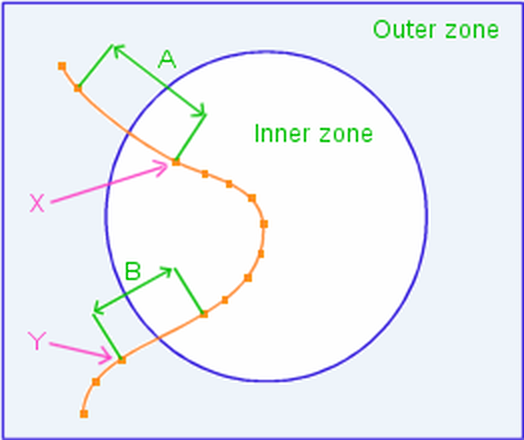
Figure 1. When the zone change at point 'X' is detected, ANY-maze adds all the distance 'A' to the distance travelled in the 'Outer zone'. When the second zone change at point 'Y' is detected, ANY-maze adds all the distance 'B' to the distance travelled in the 'Inner zone'. [Note: Distances A and B have been exaggerated in this diagram to aid explanation.]
In some situations, tracks can have small oscillations in them which tend to generate unrepresentatively large values for distance travelled. This occurs most often when an animal travels slowly while moving its body a lot - for example, while exploring an open field. To overcome this, ANY-maze uses an adaptive smoothing algorithm to attenuate these oscillations when calculating distance travelled - see figure 2. Note: The definition of what's a small oscillation is based on the animal's size.

Figure 2. Measuring the length of the actual track (shown in orange) would yield an unrepresentatively large value for distance travelled. ANY-maze uses a 'smoothed' track (shown in green) to better estimate the true distance travelled. [Note: The oscillations in this track have been exaggerated to aid explanation.]
Distance travelled until first entry into the zone
| Description | Reports the distance travelled by the animal up to its first entry into the specified zone. |
| Calculation method | The distance the animal travels is summed until it enters the zone. If the animal doesn't enter the zone during the test, then the result is undefined. |
| Analysis across time | This measure cannot be analysed across time. |
Distance travelled by the animal's head in the zone
| Description | Reports the distance the animal's head travelled while the head was in the zone. |
| Calculation method | Calculated by summing the distance travelled by the animal's head during each visit to the zone. A visit starts when the animal's head enters the zone and ends when it exits the zone. |
| Analysis across time | This measure can be analysed across time. |
| Notes | As the position of the animal's head prior to a zone entry must, by definition, be outside the zone and the position after it enters the zone must be inside, the distance between the two positions will be partly outside and partly inside the zone. ANY-maze adds all this distance to the distance travelled by the animal's head in the zone that the animal is leaving. Although this can lead to inaccuracies, they are generally very small because: a) ANY-maze detects many positions per second so the distance between any two positions is usually very small; b) Any small distance 'lost' when the animal enters a zone entry is usually counterbalanced by a small distance which is 'gained' when it leaves the zone. |
This measure is only available if Head tracking is turned on.
Distance travelled while investigating the zone
| Description | Reports the distance the animal travelled while investigating the zone. |
| Calculation method | Calculated by summing the distance travelled during each bout of investigation of the zone. A visit starts when an animal starts investigating the zone and ends when it stops investigating the zone. |
| Analysis across time | This measure can be analysed across time. For any time period, the result is the distance travelled while investigating the zone during that time period. |
Distance travelled before first investigation of the zone
| Description | Reports the distance travelled by the animal up to the point that it starts investigating the specified zone. |
| Calculation method | The distance the animal travels is summed until it starts investigating the zone. If the animal doesn't investigate the zone during the test, then the result is undefined. |
| Analysis across time | This measure cannot be analysed across time. |
Latency to first entry to the zone
| Description | Reports the length of time which elapsed before the animal entered the zone for the first time. |
| Calculation method | This value is the time at which the first zone entry occurred. If the animal doesn't enter the zone during the test, then the result is undefined. |
| Analysis across time | This measure can be analysed across time. For any time period, the result is the time from the start of the period to the first entry. If the animal doesn't enter the zone during the time period, then the result is undefined. |
This measure is affected by the option to Use the test duration as the latency for events which don't occur in the Analysis options element.
Latency to first exit from the zone
| Description | Reports the length of time which elapsed before the animal exited the zone for the first time. |
| Calculation method | This value is the time at which the first zone exit occurred. If the animal doesn't exit the zone during the test then the result is undefined. |
| Analysis across time | This measure can be analysed across time. For any time period, the result is the time from the start of the period to the first exit. If the animal doesn't exit the zone during the time period then the result is undefined. |
This measure is affected by the option to Use the test duration as the latency for events which don't occur in the Analysis options element.
Latency to last entry to the zone
| Description | Reports the length of time that elapsed up to the moment when the animal made its last entry into the zone during the test. |
| Calculation method | This value is updated at the moment of each entry into the zone. The value at the end of the test is, necessarily, the latency to the last zone entry. If the animal doesn't enter the zone during the test, then the result is undefined. |
| Analysis across time | This measure can be analysed across time. For any time period, the result is the time from the start of the period to the last entry during that period. If the animal doesn't enter the zone during the time period, then the result is undefined. |
This measure is particularly useful in water-maze tests to report the time taken by the animal to find a platform zone. In such tests, it's common to only consider the animal as finding the platform if it remains on it for a certain period, for example 5 seconds. In this case, it's possible that the animal will enter the platform zone a number of times and therefore the time to 'find' the platform will be the latency to the last entry to the zone.
This measure is affected by the option to Use the test duration as the latency for events which don't occur in the Analysis element.
Latency to the first entry of the animal's head into the zone
| Description | Reports the length of time which elapsed before the animal's head entered the zone for the first time. |
| Calculation method | This value is the time at which the animal's head first entered the zone. If the animal's head doesn't enter the zone during the test, then the result is undefined. |
| Analysis across time | This measure can be analysed across time. For any time period, the result is the time from the start of the period to the first entry of the animal's head into the zone. If the animal's head doesn't enter the zone during the time period, then the result is undefined. |
| Notes | This measure is only available if Head tracking is turned on. |
This measure is affected by the option to Use the test duration as the latency for events which don't occur in the Analysis options element.
Latency to the first exit of the animal's head from the zone
| Description | Reports the length of time which elapsed before the animal's head exited the zone for the first time. |
| Calculation method | This value is the time at which the animal's head first exited the zone. If the animal doesn't exit the zone during the test, then the result is undefined. |
| Analysis across time | This measure can be analysed across time. For any time period, the result is the time from the start of the period to the first exit of the animal's head from the zone. If the animal's head doesn't exit the zone during the time period, then the result is undefined. |
| Notes | This measure is only available if Head tracking is turned on. |
This measure is affected by the option to Use the test duration as the latency for events which don't occur in the Analysis options element.
Latency to first investigation of the zone
| Description | Reports the time that elapsed in the test before the animal investigated the zone for the first time. |
| Calculation method | The value of the test clock when the first bout of investigation began. |
The animal is deemed to be investigating the zone when its head is outside the zone but within the distance specified in the protocol of the zone's border, and, if specified in the protocol, the animal is oriented towards the zone and/or the animal's centre is not in the zone.
| Analysis across time | This measure can be analysed across time. For any time period, the result is the time from the start of the period to the time of the first bout of investigation in the period. |
Latency to end of first investigation of the zone
| Description | Reports the length of time which elapsed before the animal's first investigation of the zone ended. |
| Calculation method | This value is the time at which the animal ended its first bout of investigation of the zone. If the animal doesn't investigate the zone during the test then the result is undefined. |
| Analysis across time | This measure can be analysed across time. For any time period, the result is the time from the start of the period to the end of the animal's first bout of investigation of the zone. If the animal doesn't investigate the zone during the time period then the result is undefined. |
This measure is affected by the option to Use the test duration as the latency for events which don't occur in the Analysis options element.
Average speed in the zone
| Description | Reports the average speed of the animal while it was in the zone. |
| Analysis across time | This measure can be analysed across time. For any time period, the result is the Distance travelled in the zone during the time period divided by the Time spent in the zone during the time period. If the animal was never in the zone during the time period then the result is undefined. |
| Notes | If you want to know the average speed in the zone while mobile (i.e. ignoring periods when the animal was stationary), then use a calculation of Distance travelled in the zone / Time mobile in the zone. |
This measure is affected by the option to Use zero as the result for undefined averages in the Analysis options element.
Maximum speed in the zone
| Description | Reports the maximum speed of the animal while in the zone. |
| Calculation method | The speed of the animal between positions within the zone is calculated and the maximum speed is found. If the animal doesn't enter the zone during the test, then the result is undefined. |
| Analysis across time | This measure can be analysed across time. If the animal doesn't enter the zone during the time period, then the result is undefined. |
| Notes | The calculation of maximum speed does not use successive positions but instead requires that the animal move at least a minimum distance (which is based on the animal's size) and the speed to cover this distance is calculated. This method of calculation is used to avoid reporting the speed of movements that don't constitute locomotion of the animal. For example, if an animal scratches, its centre point may oscillate rapidly but this will not be reported as the animal's maximum speed. |
Average speed while investigating the zone
| Description | Reports the average speed of the animal while it was investigating the zone. |
This measure is affected by the option to Use zero as the result for undefined averages in the Analysis options element.
Longest visit to the zone
| Description | Reports the duration of the longest single visit to the zone. |
| Calculation method | Each zone visit is delimited by a zone entry and a zone exit - the time between the two is the duration of the visit. The duration of each visit is calculated and the largest value is found. If the animal was never in the zone during the test then the result is zero. |
| Analysis across time | This measure can be analysed across time. For any time period, the result is the duration of the longest visit to the zone during the time period. If the animal spent the entire period in the zone, then the result will be the duration of the time period itself. |
Shortest visit to the zone
| Description | Reports the duration of the shortest single visit to the zone. |
| Calculation method | Each zone visit is delimited by a zone entry and a zone exit - the time between the two is the duration of the visit. The duration of each visit is calculated and the smallest value is found. If the animal was never in the zone during the test, then the result is zero. |
| Analysis across time | This measure can be analysed across time. For any time period, the result is the duration of the shortest visit to the zone during the time period. |
Average duration of visit to the zone
| Description | Reports the average duration of visits to the zone. |
| Analysis across time | This measure can be analysed across time. For any time period, the result is Time spent in the zone during the time period divided by the Number of entries to the zone in the time period. If the animal was never in the zone during the time period, then the result is undefined. |
| Notes | This measure is affected by the option to Use zero as the result for undefined averages in the Analysis options element. |
List of the duration of each visit to the zone
| Description | Reports a comma-separated list of the duration of each visit to the zone. For example, if the animal visited the zone three times during the test, for 1 second on the first occasion and for 20 seconds on the second and third occasions then the list would be '1.0, 20.0, 20.0'. |
| Calculation method | The time of the animal's entry to the zone is noted; then, when the animal exits the zone, the duration of the visit is calculated and added to the list. If the animal is in the zone at the end of the test, the time from the entry to the end of the test is used as the duration of the last visit. |
| Analysis across time | This measure cannot be analysed across time. |
| Units | The duration of all visits is reported in seconds. |
| Notes | When included on the Data page, this measure will show all the visits to the zone in a single cell. If the spreadsheet is saved in CSV format and then opened in (for example) Microsoft Excel, then the visits will be listed in individual cells. |
The length of the list is limited to 8192 characters, but usually at least 1,000 visits will be listed before the limit is reached.
Time mobile in the zone
| Description | Reports the total time that the animal was mobile in the zone. |
Time immobile in the zone
| Description | Reports the total time that the animal was immobile in the zone. |
| Calculation method | Sums the duration of each immobile episode in the zone - see notes for the definition of an immobile episode. |
| Analysis across time | This measure can be analysed across time. For any time period, the result is the sum of the duration of each immobile episode in the zone during the period. |
| Notes | An immobile episode in the zone starts when the animal becomes immobile after being mobile or when the animal is already immobile and enters the zone. Generally, it's unlikely that an immobile animal will enter a zone, because to enter the zone it will probably have to be mobile. Nevertheless, if the animal is immobile right on the border of a zone, it could enter the zone by moving very slightly but not by enough to end the immobile episode. |
An immobile episode in the zone ends when the animal becomes mobile or when it leaves the zone.
The definition of immobility depends on the protocol - see Immobility detection.
Immobile episodes in the zone
| Description | Reports the number of times the animal became immobile while in the zone. |
| Calculation method | Counts the number of times the animal changed from being mobile to being immobile while in the zone. If an immobile animal enters a zone (see note below), then the entry will be considered to start a new immobile episode in the zone, i.e. the count of immobile episodes in the zone will be incremented. This means that the sum of the immobile episodes in all the zones may be greater than the number of immobile episodes in the apparatus as a whole. |
| Analysis across time | This measure can be analysed across time. For any time period, the result is the number of immobile episodes that started in the zone during the time period. If an animal is already immobile in the zone at the start of the time period, then a new immobile episode is NOT counted for the period. This means that it's possible to have a period for which the result of this measure is zero but the result for the Time immobile in the zone is not zero. |
| Notes | An immobile episode in the zone starts when the animal becomes immobile after being mobile or when the animal is already immobile and enters the zone. Generally, it's unlikely that an immobile animal will enter a zone, because to enter the zone it will probably have to be mobile. Nevertheless if the animal is immobile right on the border of a zone it could enter the zone by moving very slightly but not by enough to end the immobile episode. |
An immobile episode in the zone ends when the animal becomes mobile or when it leaves the zone.
The definition of immobility depends on the protocol - see Immobility detection.
Time mobile while investigating the zone
| Description | Reports the total time that the animal was mobile while investigating the zone. |
The definition of immobility depends on the protocol - see Immobility detection.
Time immobile while investigating the zone
| Description | Reports the total time that the animal was immobile while investigating the zone. |
| Calculation method | Sums the duration of each immobile episode while investigating the zone - see notes for the definition of an immobile episode. |
| Analysis across time | This measure can be analysed across time. For any time period, the result is the sum of the duration of each immobile episode while the animal was investigating the zone during the period. |
An immobile episode while investigating the zone starts when the animal becomes immobile after being mobile or when the animal is already immobile and starts investigating the zone. Generally, it's unlikely that an immobile animal will start investigating a zone, because to start investigating the zone it will probably have to move. Nevertheless, if the animal is immobile right on the border of the zone's investigation area, it could start investigating the zone by moving very slightly but not by enough to end the immobile episode.
An immobile episode while investigating the zone ends when the animal becomes mobile or when it stops investigating the zone.
The definition of immobility depends on the protocol - see Immobility detection.
Immobile episodes while investigating the zone
| Description | Reports the number of times the animal became immobile while investigating the zone. |
| Calculation method | Counts the number of times the animal changed from being mobile to being immobile while investigating the zone. If an immobile animal starts investigating a zone (see note below), then the entry will be considered to start a new immobile episode while investigating the zone, i.e. the count of immobile episodes while investigating the zone will be incremented. This means that the sum of the immobile episodes while investigating all the zones may be greater than the number of immobile episodes in the apparatus as a whole. |
| Analysis across time | This measure can be analysed across time. For any time period, the result is the number of immobile episodes that started while the animal was investigating the zone during the time period. If an animal is already immobile while investigating the zone at the start of the time period, then a new immobile episode is NOT counted for the period. This means that it's possible to have a period for which the result of this measure is zero but the result for the Time immobile while investigating the zone is not zero. |
An immobile episode while investigating the zone starts when the animal becomes immobile after being mobile or when the animal is already immobile and starts investigating the zone. Generally, it's unlikely that an immobile animal will start investigating a zone, because to enter the zone it will probably have to move. Nevertheless if the animal is immobile right on the border of the zone's investigation area, it could start investigating the zone by moving very slightly but not by enough to end the immobile episode.
An immobile episode while investigating the zone ends when the animal becomes mobile or when it stops investigating the zone.
The definition of immobility depends on the protocol - see Immobility detection.
Time active in the zone
| Description | Reports the total time that the animal was active in the zone. |
| Notes | An animal is active if it is either mobile OR it's performing some other behaviour which has been specified as an activity - grooming for example. |
Time inactive in the zone
| Description | Reports the total time that the animal was inactive in the zone. |
| Calculation method | Sums the duration of each inactive episode in the zone. |
| Analysis across time | This measure can be analysed across time. For any time period, the result is the sum of the duration of each inactive episode in the zone during the period. |
| Notes | An inactive episode in the zone starts when the animal becomes inactive after being active or when the animal enters the zone and is already inactive. An inactive episode in the zone ends when an animal becomes active or when it leaves the zone. |
Inactivity is defined as NOT activity. An animal is defined to be active if it is either mobile OR it's performing some other behaviour which has been specified as an activity - for example, grooming. If the protocol specifies that immobility should not be detected, then activity analysis will be based purely on the performance of other behaviours.
Inactive episodes in the zone
| Description | Reports the total number of times the animal became inactive while in the zone. |
| Calculation method | Counts the number of times the animal changed from being active to being inactive while in the zone. If an inactive animal enters a zone, then the entry will be considered to start a new inactivity episode in the zone, i.e. the count of inactive episodes in the zone will be incremented. This means that the sum of the inactive episodes in all the zones may be greater than the number of inactive episodes in the apparatus as a whole. |
| Analysis across time | This measure can be analysed across time. For any time period, the result is the number of inactive episodes that started in the zone during the time period. If an animal is already inactive in the zone at the start of the time period, then a new inactive episode is NOT counted for the period. This means that it's possible to have a period for which the result of this measure is zero but the result for the Time inactive in the zone is not zero. |
| Notes | An inactive episode in the zone starts when the animal becomes inactive after being active or when the animal enters the zone and is already inactive. An inactive episode in the zone ends when an animal becomes active or when it leaves the zone. |
Initial distance from the zone
| Description | Reports the distance from the animal's first position in the test to the zone |
| Calculation method | The straight line distance from the first position of the animal (see notes) to the nearest point of the zone. |
| Analysis across time | This measure can be analysed across time. The value is the distance of the animal from the zone at the start of the time period. |
| Notes | The position of the animal is either the animal's centre or the point of the animal that is closest to the zone. Which of these is used depends on whether or not the zone entry settings use the animal area to determine zone entries; when they do, the distance from the animal to the zone is based on the distance from the point of the animal that is closest to the zone; otherwise, the distance is based on the centre of the animal. |
Average distance from the zone
| Description | Reports the average distance from the animal to the zone when the animal is outside the zone. |
| Calculation method | ANY-maze calculates the distance from the animal to the zone for every position of the animal that is outside the zone. Exactly how this is done depends on whether zone entries (sic) are set to use the entire area of the animal or the animal's centre point (see Choosing how ANY-maze should detect entries into a zone for details). If entries are based on the entire area of the animal, then the calculation of the distance from the animal to the zone will also be based on the entire area of the animal - specifically, the system will use the distance from the point on the animal's edge that is closest to the zone border; on the other hand if zone entries are based on the centre of the animal, then the distance to the zone will also be based on the centre of the animal - i.e. the distance to the zone will simply be the distance from the centre to the nearest part of the zone. |
Having determined the distance from the zone, ANY-maze maintains a cumulative sum of each distance multiplied by the time the animal remained at that distance. The final result for the average distance from the zone is this cumulative sum divided by the total duration of the test or period.
The reason the system works this way is best explained using an example. Imagine the animal was 50cm from a zone and remained there for 55 seconds; it then moved to be 30cm from the zone and remained there for 5 seconds; the test then ended. Just taking the average of the two distances would imply that the average distance from the zone was 40cm, but this is very misleading as the animal spent almost the entire test 50cm from the zone. Instead, ANY-maze would calculate the average distance as [(50 x 55) + (30 x 5)] / 60 = 48.33cm. Effectively, the system weights the distances depending on how long the animal remained there.
| Analysis across time | This measure can be analysed across time. The result is based on just those positions of the animal that fall within the time period. |
| Notes | If the animal spends the entire duration of the test (or of a time period) inside the zone, then the result will be zero (i.e. the animal was no distance from the zone). |
Maximum distance from the zone
| Description | Reports the maximum distance from the animal to the zone when the animal is outside the zone. |
| Calculation method | ANY-maze calculates the distance from the animal to the zone for every position of the animal that is outside the zone. Exactly how this is done depends on whether zone entries (sic) are set to use the entire area of the animal, or the animal's centre point (see Choosing how ANY-maze should detect entries into a zone for details). If entries are based on the entire area of the animal, then the calculation of the distance from the animal to the zone will also be based on the entire area of the animal - specifically, the system will use the distance from the point on the animal's edge that is closest to the zone border; on the other hand, if zone entries are based on the centre of the animal then the distance to the zone will also be based on the centre of the animal - i.e. the distance to the zone will simply be the distance from the centre to the nearest part of the zone. Having determined the distance from the animal to the zone, the system simply notes the maximum value during the test or time period. |
| Analysis across time | This measure can be analysed across time. The result is the maximum distance considering just those positions of the animal that fall within the time period. |
| Notes | If the animal spends the entire duration of the test (or of a time period) inside the zone, then the result will be zero (i.e. the animal was no distance from the zone). |
Minimum distance from the zone
| Description | Reports the minimum distance from the animal to the zone when the animal is outside the zone. |
| Calculation method | ANY-maze calculates the distance from the animal to the zone for every position of the animal that is outside the zone. Exactly how this is done depends on whether zone entries (sic) are set to use the entire area of the animal, or the animal's centre point (see Choosing how ANY-maze should detect entries into a zone for details). If entries are based on the entire area of the animal, then the calculation of the distance from the animal to the zone will also be based on the entire area of the animal - specifically, the system will use the distance from the point on the animal's edge that is closest to the zone border; on the other hand, if zone entries are based on the centre of the animal then the distance to the zone will also be based on the centre of the animal - i.e. the distance to the zone will simply be the distance from the centre to the nearest part of the zone. Having determined the distance from the animal to the zone, the system simply notes the minimum value during the test or time period. |
| Analysis across time | This measure can be analysed across time. The result is the minimum distance considering just those positions of the animal that fall within the time period. |
| Notes | If the animal enters the zone, then this value is automatically set to zero. |
Cumulative distance from the zone
| Description | Reports the sum of the product of the distance from the zone and the time at that distance. |
| Calculation method | For every position of the animal, this calculates the distance from the zone multiplied by the time the animal stayed at that position. The final result is the sum of all these values. |
| Analysis across time | This measure can be analysed across time. |
| Notes | This value represents the area under the curve of a graph of distance from zone vs. time. |
Average distance of the animal's head from the zone
| Description | Reports the average distance from the animal's head to the zone when the animal is outside the zone. |
| Calculation method | ANY-maze calculates the distance from the animal's head to the closest point on the zone border for every position of the animal's head that is outside the zone. The system maintains a cumulative sum of each distance multiplied by the time the animal remained at that distance. The final result for the average distance of the animal's head from the zone is this cumulative sum divided by the total duration of the test or period. |
The reason the system works this way is best explained using an example. Imagine the animal's head was 50cm from a zone and remained there for 55 seconds; it then moved to be 30cm from the zone and remained there for 5 seconds; the test then ended. Just taking the average of the two distances would imply that the average distance from the zone was 40cm, but this is very misleading as the animal spent almost the entire test 50cm from the zone. Instead, ANY-maze would calculate the average distance as [(50 x 55) + (30 x 5)] / 60 = 48.33cm. Effectively, the system weights the distances depending on how long the animal remained there.
| Analysis across time | This measure can be analysed across time. The result is based on just those positions of the animal's head that fall within the time period. |
| Notes | This measure is only available if Head tracking is turned on. |
If the animal's head spends the entire duration of the test (or of a time period) inside the zone, then the result will be zero (i.e. the animal's head was no distance from the zone).
Maximum distance of the animal's head from the zone
| Description | Reports the maximum distance from the animal's head to the zone when the animal is outside the zone. |
| Calculation method | For each position of the animal's head that is outside the zone, ANY-maze calculates the distance from the head to the closest point on the zone border. The maximum such distance is found. |
| Analysis across time | This measure can be analysed across time. The result is based on just those positions of the animal's head that fall within the time period. |
| Notes | This measure is only available if Head tracking is turned on. |
If the animal's head spends the entire duration of the test (or of a time period) inside the zone, then the result will be zero (i.e. the animal's head was no distance from the zone).
Minimum distance of the animal's head from the zone
| Description | Reports the minimum distance from the animal's head to the zone when the animal is outside the zone. |
| Calculation method | For each position of the animal's head that is outside the zone, ANY-maze calculates the distance from the head to the closest point on the zone border. The minimum such distance is found. |
| Analysis across time | This measure can be analysed across time. The result is based on just those positions of the animal's head that fall within the time period. |
| Notes | This measure is only available if Head tracking is turned on. |
If the animal's head enters the zone, then this value will be zero.
Average distance to the zone border
| Description | Reports the average distance from the animal to the border of the zone when the animal is inside the zone. |
| Calculation method | ANY-maze calculates the distance from the animal to the zone border for every position of the animal that is inside the zone. Exactly how this is done depends on whether zone entries (sic) are set to use the entire area of the animal or the animal's centre point (see Choosing how ANY-maze should detect entries into a zone for details). If entries are based on the entire area of the animal then the calculation of the distance from the animal to the zone border will also be based on the entire area of the animal - specifically the system will use the distance from the point on the animal's edge that is closest to the zone border; on the other hand if zone entries are based on the centre of the animal then the distance to the zone border will also be based on the centre of the animal - i.e. the distance to the zone will simply be the distance from the centre to the nearest border of the zone. |
Having determined the distance to the zone border ANY-maze maintains a cumulative sum of each distance multiplied by the time the animal remained at that distance. The final result for the average distance to the zone border is this cumulative sum divided by the total duration of the test or period.
The reason the system works this way is best explained using an example. Imagine the animal was 20cm from a zone border and remained there for 55 seconds; it then moved to be 10cm from the zone border and remained there for 5 seconds; the test then ended. Just taking the average of the two distances would imply that the average distance from the zone border was 15cm, but this is very misleading as the animal spent almost the entire test 20cm from the border. Instead, ANY-maze would calculate the average distance as [(20 x 55) + (10 x 5)] / 60 = 19.16cm. Effectively, the system weights the distances depending on how long the animal remained there.
| Analysis across time | This measure can be analysed across time. The result is based on just those positions of the animal that fall within the time period. |
| Notes | If the animal never enters the zone, then the result is either undefined or zero depending on the setting Use zero as the result for undefined averages in the Analysis options element. |
Maximum distance to the zone border
| Description | Reports the maximum distance from the animal to the border of the zone when the animal is inside the zone. |
| Calculation method | ANY-maze calculates the distance from the animal to the zone border for every position of the animal that is inside the zone. Exactly how this is done depends on whether zone entries (sic) are set to use the entire area of the animal or the animal's centre point (see Choosing how ANY-maze should detect entries into a zone for details). If entries are based on the entire area of the animal, then the calculation of the distance from the animal to the zone border will also be based on the entire area of the animal - specifically, the system will use the distance from the point on the animal's edge that is closest to the zone border; on the other hand, if zone entries are based on the centre of the animal then the distance to the zone border will also be based on the centre of the animal - i.e. the distance to the zone will simply be the distance from the centre to the nearest border of the zone. Having determined the distance to the border, the system simply notes the maximum value during the test or time period. |
| Analysis across time | This measure can be analysed across time. The result is the maximum distance considering just those positions of the animal that fall within the time period. |
| Notes | If the animal never enters the zone, then the result is undefined. |
Minimum distance to the zone border
| Description | Reports the minimum distance from the animal to the border of the zone when the animal is inside the zone. |
| Calculation method | ANY-maze calculates the distance from the animal to the zone border for every position of the animal that is inside the zone. Exactly how this is done depends on whether zone entries (sic) are set to use the entire area of the animal or the animal's centre point (see Choosing how ANY-maze should detect entries into a zone for details). If entries are based on the entire area of the animal, then the calculation of the distance from the animal to the zone border will also be based on the entire area of the animal - specifically, the system will use the distance from the point on the animal's edge that is closest to the zone border; on the other hand, if zone entries are based on the centre of the animal then the distance to the zone border will also be based on the centre of the animal - i.e. the distance to the zone will simply be the distance from the centre to the nearest border of the zone. Having determined the distance to the border, the system simply notes the minimum value during the test or time period. |
| Analysis across time | This measure can be analysed across time. The result is the minimum distance considering just those positions of the animal that fall within the time period. |
| Notes | If the animal never enters the zone, then the result is undefined. If the animal exits the zone, this value is automatically set to zero. |
Average distance from the animal's head to the zone border
| Description | Reports the average distance from the animal's head to the border of the zone when the animal is inside the zone. |
| Calculation method | ANY-maze calculates the distance from the animal's head to the closest point on the zone border for every position of the animal's head that is inside the zone. The system maintains a cumulative sum of each distance multiplied by the time the animal remained at that distance. The final result for the average distance to the zone border is this cumulative sum divided by the total duration of the test or period. |
The reason the system works this way is best explained using an example. Imagine the animal's head was 20cm from a zone border and remained there for 55 seconds; it then moved to be 10cm from the zone border and remained there for 5 seconds; the test then ended. Just taking the average of the two distances would imply that the average distance from the animal's head to the zone border was 15cm, but this is very misleading as the animal's head spent almost the entire test 20cm from the border. Instead, ANY-maze would calculate the average distance as [(20 x 55) + (10 x 5)] / 60 = 19.16cm. Effectively, the system weights the distances depending on how long the animal remained there.
| Analysis across time | This measure can be analysed across time. The result is based on just those positions of the animal's head that fall within the time period. |
| Notes | If the animal's head never enters the zone, then the result is either undefined or zero depending on the setting Use zero as the result for undefined averages in the Analysis options element. |
This measure is only available if Head tracking is turned on.
Maximum distance from the animal's head to the zone border
| Description | Reports the maximum distance from the animal's head to the border of the zone when the animal is inside the zone. |
| Calculation method | For each position of the animal's head that is inside the zone, ANY-maze calculates the distance from the head to the closest point on the zone border. The maximum such distance is found. |
| Analysis across time | This measure can be analysed across time. The result is based on just those positions of the animal's head that fall within the time period. |
| Notes | If the animal's head never enters the zone, then the result is undefined. |
This measure is only available if Head tracking is turned on.
Minimum distance from the animal's head to the zone border
| Description | Reports the minimum distance from the animal's head to the border of the zone when the animal is inside the zone. |
| Calculation method | For each position of the animal's head that is inside the zone, ANY-maze calculates the distance from the head to the closest point on the zone border. The minimum such distance is found. |
| Analysis across time | This measure can be analysed across time. The result is based on just those positions of the animal's head that fall within the time period. |
| Notes | If the animal's head never enters the zone, then the result is undefined. |
This measure is only available if Head tracking is turned on.
Average X position in the zone (as a percentage of the zone's width)
| Description | Reports the average X position of the animal's centre point in relation to the zone. The left side of the zone is considered 0%, and the right side is considered 100%. For example, an animal might have an average X position of 25% relative to the zone, meaning that, on average, the animal's X position when it was in the zone was a quarter of the way across. |
The left side of a zone is the point furthest to the left. For example, in a circular zone, the left side would be at the 9 o'clock position, while the right side would be at the 3 o'clock position.
| Calculation method | Each X coordinate of the animal while inside the zone is multiplied by the duration for which the animal remained at that coordinate, and these values are summed over the test or time period. The average X coordinate is then calculated by dividing this sum by the duration of the test or time period. |
The coordinate of the left side of the zone is subtracted from this average coordinate, and the resulting value is expressed as a percentage of the zone's width (i.e., the coordinate of the right side of the zone minus the coordinate of the left side of the zone).
| Analysis across time | This measure can be analysed across time. The result is based on just those positions of the animal that fall within the time period. |
| Notes | The measure is not available in zones where the animal is considered to be in the zone when it is not in any other zone. |
This measure can yield a result that is not within the zone. For example, consider a zone in the shape of a ring (like a doughnut). If the animal spent half the test on the left side of the ring and the other half on the right side, the average position would be at 50% (i.e. in the middle of the ring), even though that is not within the zone.
Average Y position in the zone (as a percentage of the zone's height)
| Description | Reports the average Y position of the animal's centre point in relation to the zone. The top of the zone is considered 0%, and the bottom is considered 100%. For example, an animal might have an average Y position of 25% relative to the zone, meaning that, on average, the animal's Y position when it was in the zone was a quarter of the way down. |
The top of a zone is the point nearest the top. For example, in a circular zone, the top would be at the 12 o'clock position, while the bottom would be at the 6 o'clock position.
| Calculation method | Each Y coordinate of the animal while inside the zone is multiplied by the duration for which the animal remained at that coordinate, and these values are summed over the test or time period. The average Y coordinate is then calculated by dividing this sum by the duration of the test or time period. |
The coordinate of the top of the zone is subtracted from this average coordinate, and the resulting value is expressed as a percentage of the zone's height (i.e., the coordinate of the bottom of the zone minus the coordinate of the top of the zone).
| Analysis across time | This measure can be analysed across time. The result is based on just those positions of the animal that fall within the time period. |
| Notes | The measure is not available in zones where the animal is considered to be in the zone when it is not in any other zone. |
This measure can yield a result that is not within the zone. For example, consider a zone in the shape of a ring (like a doughnut). If the animal spent half the test at the top of the ring and the other half at the bottom, the average position would be at 50% (i.e. in the middle of the ring), even though that is not within the zone.
Time getting closer to the zone
| Description | Reports the total amount of time that the animal was outside the zone and was getting closer to it. |
| Calculation method | ANY-maze calculates the distance from the animal to the zone for every position of the animal that is outside the zone. Exactly how this is done depends on whether zone entries (sic) are set to use the entire area of the animal or the animal's centre point (see Choosing how ANY-maze should detect entries into a zone for details). If entries are based on the entire area of the animal, then the calculation of the distance from the animal to the zone will also be based on the entire area of the animal - specifically, the system will use the distance from the point on the animal's edge that is closest to the zone border; on the other hand, if zone entries are based on the centre of the animal then the distance to the zone will also be based on the centre of the animal - i.e. the distance to the zone will simply be the distance from the centre to the nearest part of the zone. |
Having calculated the distance to the zone, ANY-maze compares it to the previous distance to the zone; if it is less, then the animal is getting closer to the zone and the time from the previous position to this one is added to the total time getting closer to the zone. Note that very small movements of the animal will be ignored by the system (the definition of very small being based on the animal's size).
| Analysis across time | This measure can be analysed across time. The result is based on just those positions of the animal that fall within the time period. |
| Notes | This measure seems very similar to the Time moving towards the zone, but is calculated quite differently (see the definition of Time moving towards the zone for details on how it's calculated). The principal difference is that this measure relates to the animal's distance from the zone, whereas the Time moving towards the zone measure relates to the animal's heading. A good example of this difference is when a zone is in the form of a ring. In this case, if the animal is moving inside the ring it would always be 'moving towards' the zone as the zone surrounds it, but it could still either be getting closer or further from the zone. (In fact, it would always be moving both towards and away from the zone, so because of this ambiguity, ANY-maze simply wouldn't score either of these measures.) |
Time getting further away from the zone
| Description | Reports the total amount of time that the animal was outside the zone and was getting further away from it. |
| Calculation method | ANY-maze calculates the distance from the animal to the zone for every position of the animal that is outside the zone. Exactly how this is done depends on whether zone entries (sic) are set to use the entire area of the animal or the animal's centre point (see Choosing how ANY-maze should detect entries into a zone for details). If entries are based on the entire area of the animal, then the calculation of the distance from the animal to the zone will also be based on the entire area of the animal - specifically, the system will use the distance from the point on the animal's edge that is closest to the zone border; on the other hand, if zone entries are based on the centre of the animal then the distance to the zone will also be based on the centre of the animal - i.e. the distance to the zone will simply be the distance from the centre to the nearest part of the zone. |
Having calculated the distance to the zone, ANY-maze compares it to previous distance to the zone; if it is greater, then the animal is getting further away from the zone and the time from the previous position to this one is added to the total time getting further away from the zone. Note that very small movements of the animal will be ignored by the system (the definition of very small being based on the animal's size).
| Analysis across time | This measure can be analysed across time. The result is based on just those positions of the animal that fall within the time period. |
| Notes | This measure seems very similar to the Time moving away from the zone, but is calculated quite differently (see the definition of Time moving away from the zone for details on how it's calculated). The principal difference is that this measure relates to the animal's distance from the zone, whereas the Time moving away from the zone measure relates to the animal's heading. A good example of this difference is when a zone is in the form of a ring. In this case, if the animal is moving inside the ring it would always be 'moving away from' the zone as the zone surrounds it, but it could still either be getting closer or further from the zone. (In fact, it would always be moving both towards and away from the zone, so because of this ambiguity, ANY-maze simply wouldn't score either of these measures.) |
Initial heading error to the zone
| Description | Reports the angle between the animal's heading at the start of the test and a direct heading to the zone. |
| Calculation method | Calculation of this measure depends on the settings in the Analysis options > Heading error sub-element of the protocol. Specifically, the options control both how the animal's heading at the start of the test is determined and what part of the zone is used to calculate the heading error. |
There are two options for how the animal's heading at the start of the test is determined - one uses a specific time delay, the other a specific distance. In the first case, the animal's heading is taken to be the vector from its first position in the test to the first position detected after the specified time interval has elapsed. In the second case, the heading is taken to be the vector from the animal's first position in the test to the first position that's more than the specified distance from it. In both cases, positions that are detected while the animal is considered to be immobile (if immobility detection is switched on) are ignored - thus in the first case, the animal must be mobile for the period that is specified.
Having determined the animal's initial heading, the system then calculates the heading from the first position in the test to the zone. To do this, ANY-maze can use one of two methods (again, these are specified using the Analysis options > Heading error sub-element in the protocol); it can either simply calculate the heading to the centre of the zone or it can calculate the heading to any part of the zone.
In the first case (see figure 3), the centre of the zone is taken to be the zone's 'centre of mass' (i.e. the mean x, y coordinate of all the points in the zone) and the heading error is defined as the angle between this heading and the animal's initial heading.

Figure 3. Calculation of the initial heading error using the centre of the zone: The animal's initial heading error is the angle 'A' between its initial heading and the direct heading to the centre of the zone.
It's important to understand that a zone's centre of mass may actually be outside the zone. For example, consider a ring-shaped zone; the centre of mass will be in the centre of the ring, but this point will not be within the zone.
The second method of calculating the heading to the zone is to consider the heading to every position on the zone's perimeter - in this case, the heading error is the smallest angle between the animal's heading and the heading to any perimeter point - see figure 4.

Figure 4. Calculation of the initial heading error using the entire area of the zone: The animal's initial heading error is the smallest angle 'A' between its initial heading and any point on the zone perimeter.
In the case of small zones the difference between the two calculation techniques is usually minimal, but for a large zone, it can make a substantial difference to the result.
| Analysis across time | This measure cannot be analysed across time. |
Signed initial heading error to the zone
| Description | Reports the angle between the animal's heading at the start of the test and a direct heading to the zone. A positive initial heading error means the zone is to the animal's right, and a negative initial heading error signifies the zone is to the animal's left. |
| Calculation method | Calculation of this measure depends on the settings in the Analysis options > Heading error sub-element of the protocol. Specifically, the options control both how the animal's heading at the start of the test is determined and what part of the zone is used to calculate the heading error. |
There are two options for how the animal's heading at the start of the test is determined - one uses a specific time delay, the other a specific distance. In the first case, the animal's heading is taken to be the vector from its first position in the test to the first position detected after the specified time interval has elapsed. In the second case, the heading is taken to be the vector from the animal's first position in the test to the first position that's more than the specified distance from it. In both cases, positions that are detected while the animal is considered to be immobile (if immobility detection is switched on) are ignored - thus in the first case, the animal must be mobile for the period that is specified.
Having determined the animal's signed initial heading, the system then calculates the heading from the first position in the test to the zone. To do this, ANY-maze can use one of two methods (again, these are specified using the Analysis options > Heading error sub-element in the protocol); it can either simply calculate the heading to the centre of the zone, or it can calculate the heading to any part of the zone.
In the first case (see figure 5), the centre of the zone is taken to be the zone's 'centre of mass' (i.e. the mean x, y coordinate of all the points in the zone) and the heading error is defined as the angle between this heading and the animal's initial heading.

Figure 5. Calculation of the signed initial heading error using the centre of the zone: The animal's signed initial heading error is the angle 'A' between its initial heading and the direct heading to the centre of the zone. In this figure, the signed initial heading error will be a negative value, as the zone is to the animal's left.
It's important to understand that a zone's centre of mass may actually be outside the zone. For example, consider a ring-shaped zone; the centre of mass will be in the centre of the ring, but this point will not be within the zone.
The second method of calculating the heading to the zone is to consider the heading to every position on the zone's perimeter - in this case, the heading error is the smallest angle between the animal's heading and the heading to any perimeter point - see figure 6.

Figure 6. Calculation of the signed initial heading error using the entire area of the zone: The animal's initial heading error is the smallest angle 'A' between its initial heading and any point on the zone perimeter.
In the case of small zones, the difference between the two calculation techniques is usually minimal, but for a large zone it can make a substantial difference to the result.
| Analysis across time | This measure cannot be analysed across time. |
Average absolute heading error to the zone
| Description | Reports the average absolute angle between the animal's heading and a direct heading to the zone. |
| Calculation method | The method used to calculate this measure depends on the option specified in the Analysis options > Heading error sub-element in the protocol. Specifically, there are two ways to determine the heading to the zone - using the centre of the zone or using the entire zone area. |
In the first case, the heading to the zone is taken to be the heading to the centre of the zone, where the centre is defined as the zone's 'centre of mass' (i.e. the mean x, y coordinate of all the points in the zone). It's important to understand that the centre of mass may actually be outside the zone. For example, consider a ring- shaped zone; the centre of mass will be in the centre of the ring, but this point will not be within the zone. With this definition of the heading to the zone, the heading error for a position is calculated as follows: The animal's heading is defined as the vector that joins the position with the next position in time. The heading to the zone is defined as the vector that joins the position to the centre of the zone and the heading error is defined as the angle between the two vectors - see figure 7.

Figure 7. Calculation of the average heading error using the centre of the zone: The animal's heading error is the angle 'A' between its heading and the direct heading to the centre of the zone.
In the case where the heading to the zone is defined using the entire zone area, the calculation of the heading error is performed as follows: The animal's heading is defined as the vector that joins the position with the next position in time. The heading to the zone is then calculated for every point on the zone's perimeter, and the angle between this heading and the animal's heading is calculated. The smallest angle is the heading error - see figure 8.

Figure 8. Calculation of the average heading error using the entire area of the zone: The animal's heading error is the smallest angle 'A' between its heading and the direct heading to any point on the zone perimeter.
Irrespective of which method is used to calculate the individual heading errors, the average absolute heading error is calculated in the same way: Each absolute heading error angle is multiplied by the time for which it persisted (i.e. the time from one position of the animal to the next). This product is then summed for the entire test (or time period). The final sum is then divided by the test duration (or the duration of the time period). This seemingly strange method of calculating the average is required because positions in ANY-maze are not necessarily recorded at a fixed frequency.
If immobility is being detected in a test, then all positions when the animal is deemed to be immobile are ignored in the calculation of the average heading error. If immobility is not being detected, then all positions are used with the caveat that a position must be at least a minimum distance from the previous position for it to be considered. The value used for this minimum distance is based on the size of the animal.
| Analysis across time | This measure can be analysed across time. The result is based on just those positions that fall within the time period. |
Time moving towards the zone
| Description | Reports the total amount of time for which the animal was moving towards the zone. |
| Calculation method | The method used to calculate this measure depends on the option specified in the Orientation and movement element of the protocol. Specifically, the measure can either be based on the centre of the zone or on the zone's entire area. |
In the first case, the measure is calculated as follows: For each position of the animal, a vector is created between the current position and the next position. A second vector is then created between the current position and the centre of the zone. The angle between these two vectors is calculated - see figure 9.

Figure 9. ANY-maze calculates the angle 'A' between the animal's heading and a direct heading to the zone; if this is less than a critical angle, the animal is deemed to be moving towards the zone.
Here, the centre of the zone is defined as the zone's 'centre of mass' (i.e. the mean x, y coordinate of all the points in the zone). It's important to understand that the centre of mass may actually be outside the zone. For example, consider a ring- shaped zone; the centre of mass will be in the centre of the ring, but this point will not be within the zone.
Having calculated the angle between the two vectors ('A'), it is compared to the critical angle for movement towards a zone (see notes). If the angle is less than this critical angle, then the animal is deemed to be moving towards the zone (unless it is also moving away from it - see notes) and the time it took to move from the current position to the next position is added to the total time moving towards the zone.
The second method used to calculate this measure uses the entire area of the zone. In this case, for each position of the animal, a vector is created between the current position and the next position. All possible vectors from the current position to the points on the zone's perimeter are then calculated, and the angle between each one and the animal's heading vector is calculated. The smallest of these angles is found. This angle is then compared to the critical angle for movement towards a zone in the same way as for the first calculation method (see above).
| Analysis across time | This measure can be analysed across time. The result is calculated using just those positions which fall within the time period. |
| Notes | The critical angle used to define whether the animal is moving towards the zone is specified in the protocol's Orientation and movement element. In fact, the value entered in the analysis options is twice the critical angle described here, as this is more intuitive. The default critical angle is 90° (i.e. by default, the angle 'A' will be compared to 45°). |
When calculating whether the animal is moving towards a zone, the system takes into consideration whether the animal is also moving away from the zone (see Time moving away from the zone). If it is, then the position is deemed to be ambiguous and the time from the position to the next position is NOT added to the overall result. A simple example of when this situation would arise is with a ring-shaped zone. If the animal is inside the ring, then no matter what direction it moves in, it will moving both towards the zone and away from it (as the zone surrounds the animal). The measures Time getting closer to the zone and Time getting further away from the zone offer alternatives that avoid this problem.
Time moving away from the zone
| Description | Reports the total amount of time for which the animal was moving away from the zone. |
| Calculation method | The method used to calculate this measure depends on the option specified in the Orientation and movement element of the protocol. Specifically, the measure can either be based on the centre of the zone or on the zone's entire area. |
In the first case, the measure is calculated as follows: For each position of the animal, a vector is created between the current position and the next position. A second vector is then created between the current position and the centre of the zone. The angle between these two vectors ('B') is calculated and deducted from 180°, yielding angle 'A' - see figure 10.

Figure 10. ANY-maze calculates the angle 'B' between the animal's heading and a direct heading to the zone; this is deducted from 180°, yielding angle 'A'. If this angle is less than a critical angle, the animal is deemed to be moving away from the zone.
Here, the centre of the zone is defined as the zone's 'centre of mass' (i.e. the mean x, y coordinate of all the points in the zone). It's important to understand that the centre of mass may actually be outside the zone. For example, consider a ring- shaped zone; the centre of mass will be in the centre of the ring, but this point will not be within the zone.
Having calculated the angle 'A', it is compared to the critical angle for movement away from a zone (see notes). If the angle is less than this critical angle, then the animal is deemed to be moving away from the zone (unless it is also moving towards it - see notes) and the time it took to move from the current position to the next position is added to the total time moving away from the zone.
The second method used to calculate this measure uses the entire area of the zone. In this case, for each position of the animal, a vector is created between the current position and the next position. All possible vectors from the current position to the points on the zone's perimeter are then calculated, and the angle between each one and the animal's heading vector is calculated. The largest of these angles is found. This angle is deducted from 180° and the result is compared to the critical angle for movement away from a zone in the same way as for the first calculation method (see above).
| Analysis across time | This measure can be analysed across time. The result is calculated using just those positions which fall within the time period. |
| Notes | The critical angle used to define whether the animal is moving away from the zone is also specified in the protocol's Orientation and movement element. In fact, the value entered in the analysis options is twice the critical angle as described here, as this is more intuitive. The default critical angle is 90° (i.e. by default, the angle 'A' will be compared to 45°). |
When calculating whether the animal is moving away from a zone, the system takes into consideration whether the animal is also moving towards the zone (see Time moving towards the zone). If it is, then the position is deemed to be ambiguous and the time from the position to the next position is NOT added to the overall result. A simple example of when this situation would arise is a ring-shaped zone. If the animal is inside the ring, then no matter what direction it moves it will be moving both towards the zone and away from it (as the zone surrounds the animal). The measures Time getting closer to the zone and Time getting further away from the zone offer alternatives that avoid this problem.
Time oriented towards the zone
| Description | Reports the total amount of time the animal was oriented towards the zone (while outside the zone). |
| Calculation method | The animal's orientation is defined by a vector connecting the start of the head vector position to the head position. For most animals, excluding quails, the start of the head vector position is the animal's centre. However, in the case of quails, it is a point near the base of the neck, which was determined during tracking. A second vector from the animal's head position to a point on the border of the zone is determined, and if the absolute angle between the vectors is less than or equal to a critical angle (see notes), then the animal is deemed to be oriented towards the zone. This is repeated for every point on the zone's border until either the animal is found to be oriented towards the zone or all the points on the zone's border have been processed. |
If the animal is oriented towards the zone then the time between the previous position of the animal and its current position is added to the total time oriented towards the zone (irrespective of whether it was oriented towards the zone at the previous position).
| Analysis across time | This measure can be analysed across time. |
| Notes | The critical angle used to define whether the animal is moving towards the zone is also specified in the Orientation and movement element of the protocol. In fact. the value entered in the analysis options is twice the critical angle as described here, as this is more intuitive. The default critical angle is 60° (i.e. by default. the angle between the vectors will be compared to 30°). |
Time oriented towards the centre of the zone when inside zone
| Description | Reports the amount of time the animal was oriented towards the centre of the zone while it was inside the zone. |
| Calculation method | The animal's orientation is defined by a vector connecting the start of the head vector position to the head position. For most animals, excluding quails, the start of the head vector position is the animal's centre. However, in the case of quails, it is a point near the base of the neck, which was determined during tracking. A second vector from the animal's head position to the centre of the zone is determined, and if the angle between the vectors is less than or equal to a critical angle (see notes), then the animal is deemed to be oriented towards the zone. The amount of time for which this is the case while the animal is inside the zone (as determined by the zone entry criteria) is summed. |
| Analysis across time | This measure can be analysed across time. |
| Notes | The critical angle used to define whether the animal is moving towards the zone is also specified in the Orientation and movement element of the protocol. In fact. the value entered in the analysis options is twice the critical angle as described here, as this is more intuitive. The default critical angle is 60° (i.e. by default. the angle between the vectors will be compared to 30°). |
Absolute turn angle while in the zone
| Description | Reports the sum of the absolute angle between each movement vector of the animal while it was inside the zone. |
| Calculation method | For each position of the animal that is inside the zone, a vector of movement from one position of the animal's centre point to the next is created. For each vector, the angle between it and the previous vector is calculated with anti-clockwise movement being negative and clockwise movement being positive (i.e. the angle is from -180° to 180°). The absolute value of this angle is summed for all the positions of the animal within the zone throughout the test or time period. |
| Analysis across time | This measure can be analysed across time. The result is based on just those positions within the specific time period. |
| Notes | From this measure, it is easy to use calculations to derive measures such as Meander in the zone and Angular velocity in the zone. The former is the Absolute turn angle while in the zone divided by the Distance travelled in the zone and the latter is the Absolute turn angle while in the zone divided by the Time in the zone. |
Absolute head turn angle while in the zone
| Description | Reports the cumulative absolute angle through which the animal's head moved while it was in the zone. For example, if while in the zone, the animal moved its head 30° to the left and then moved its head 45° to the right, the absolute head turn angle would be 75°. |
| Calculation method | For each position of the animal's head, a vector is created from the animal's centre point to the head. The angle between this vector and the same vector for the previous position of the animal's head is calculated, and the absolute value of this angle is summed whenever the animal is in the zone. |
| Analysis across time | This measure can be analysed across time. |
| Notes | As described above, calculation of this measure requires two vectors which are generated from two consecutive head positions. It is the second of these two positions which is used to determine whether the animal is in the zone. Thus, for example, the animal might be oriented North and standing outside the zone; if it then moves into the zone and is then oriented West, the 90° change in orientation will all be attributed to the zone that it has just entered. |
Whether the animal is in the zone is determined by the zone entry settings. Note that these may not require that either the head or the centre point are actually in the zone.
Freezing bouts in the zone
| Description | Reports the number of times the animal froze while in the zone. |
| Calculation method | Each time the animal starts to freeze, a check is made to determine whether it is in the zone. If it is, the count is incremented by one. |
| Analysis across time | This measure can be analysed across time. |
Time freezing in the zone
| Description | Reports the total time the animal was frozen while in the zone. |
| Calculation method | The duration of each bout of freezing is calculated. If the animal was in the zone while frozen, then the duration is added to the result for the zone. |
| Analysis across time | This measure can be analysed across time. |
Freezing bouts while investigating the zone
| Description | Reports the number of times the animal froze while investigating the zone. |
| Calculation method | Each time the animal starts to freeze, a check is made to determine whether it is investigating the zone. If it is, the count is incremented by one. |
| Analysis across time | This measure can be analysed across time. |
Time freezing while investigating the zone
| Description | Reports the total time that the animal was frozen while investigating the zone. |
| Calculation method | The duration of each bout of freezing is calculated. If the animal was investigating the zone while frozen, then the duration is added to the result for the zone. |
| Analysis across time | This measure can be analysed across time. |
Number of rears in the zone
| Description | Reports the number of times the animal reared while in the zone. |
| Analysis across time | This measure can be analysed across time. |
| Notes | This measure is only available if the apparatus is being viewed from the side. ANY-maze actually detects rearing by analysing the shape of the animal, and therefore this measure will only work reliably if there is good contrast between the animal and the background of the apparatus. |
Total time rearing in the zone
| Description | Reports the total amount of time for which the animal was rearing while it was in the zone. |
| Calculation method | Sums the duration of each bout of rearing that occurred while the animal was in the zone. If the animal enters the zone when it is already rearing, then the time will be counted from the time the animal entered the zone and not when the rearing bout started. If the animal exits the zone while rearing, then the time will stop at the time the animal exits the zone and not at the end of the rearing bout. For these reasons, it is possible for the result of this measure to be non-zero when the result for Number of rears in the zone is zero. |
| Analysis across time | This measure can be analysed across time. |
| Notes | This measure is only available if the apparatus is being viewed from the side. ANY-maze actually detects rearing by analysing the shape of the animal, and therefore this measure will only work reliably if there is good contrast between the animal and the background of the apparatus. |
Latency to first rear in the zone
| Description | Reports the latency to first time that the animal reared in the zone. |
| Calculation method | The time when the first bout of rearing started while the animal was in the zone. |
| Analysis across time | This measure cannot be analysed across time. |
| Notes | This measure is only available if the apparatus is being viewed from the side. ANY-maze actually detects rearing by analysing the shape of the animal, and therefore this measure will only work reliably if there is good contrast between the animal and the background of the apparatus. |
This measure is affected by the option to Use the test duration as the latency for events which don't occur in the Analysis options element.
Average duration of a rear in the zone
| Description | Reports the average duration of the rearing bouts in the zone. |
| Analysis across time | This measure can be analysed across time. |
| Notes | This measure is only available if the apparatus is being viewed from the side. ANY-maze actually detects rearing by analysing the shape of the animal, and therefore this measure will only work reliably if there is good contrast between the animal and the background of the apparatus. |
This measure is affected by the option to Use zero as the result for undefined averages in the Analysis options element.
Maximum duration of a rear in the zone
| Description | Reports the duration of the longest bout of rearing in the zone. |
| Calculation method | The duration of each bout of rearing in the zone is calculated and the longest bout is found. Note that a bout of rearing in the zone starts when the animal is in the zone and begins to rear OR when the animal enters the zone when it is already rearing. Similarly, a bout ends when the animal is in the zone and stops rearing OR the animal exits the zone while rearing. |
| Notes | This measure is only available if the apparatus is being viewed from the side. ANY-maze actually detects rearing by analysing the shape of the animal, and therefore this measure will only work reliably if there is good contrast between the animal and the background of the apparatus. |
Minimum duration of a rear in the zone
| Description | Reports the duration of the shortest bout of rearing in the zone. |
| Calculation method | The duration of each bout of rearing in the zone is calculated and the shortest bout is found. Note that a bout of rearing in the zone starts when the animal is in the zone and begins to rear OR when the animal enters the zone when it is already rearing. Similarly, a bout ends when the animal is in the zone and stops rearing OR the animal exits the zone while rearing. |
| Notes | This measure is only available if the apparatus is being viewed from the side. ANY-maze actually detects rearing by analysing the shape of the animal, and therefore this measure will only work reliably if there is good contrast between the animal and the background of the apparatus. |
Time spent in Whishaw's Corridor
| Description | Reports the amount of time the animal spent in the Whishaw's Corridor for the zone. |
| Calculation method | The Whishaw's Corridor for the zone is determined based on the start position of the animal in the test, the centre point of the zone, and the width of the corridor specified in the protocol - see figure 11. |

Figure 11. Example of the Whishaw's Corridor in a water-maze. The corridor is centred on a line (shown in red) running from the animal's start position to the centre of the platform zone. The corridor itself (shown in blue) has a width specified in the protocol.
The time spent in the corridor is then calculated by summing the duration of each visit to the corridor, where a visit starts at the time of entry and ends at the time of exit.
| Analysis across time | This measure can be analysed across time. For any time period, the result is the total amount of time the animal spent within the corridor during that time period. |
| Notes | This measure is only available if the Whishaw's Corridor width has been specified for the zone - see setting up a zone. |
Distance travelled in Whishaw's Corridor
| Description | Reports the distance travelled by the animal in the Whishaw's Corridor for the zone. |
| Calculation method | The Whishaw's Corridor for the zone is determined based on the start position of the animal in the test, the centre point of the zone, and the width of the corridor specified in the protocol - see figure 12. |

Figure 12. Example of Whishaw's Corridor in a water-maze. The corridor is centred on a line (shown in red) running from the animal's start position to the centre of the platform zone. The corridor itself (shown in blue) has a width specified in the protocol.
The distance travelled in the corridor is then calculated by summing the distance travelled during each visit to the corridor, where a visit starts when an animal enters the zone and ends when it exits the zone.
| Analysis across time | This measure can be analysed across time. For any time period, the result is the distance travelled within the corridor during that time period. |
| Notes | This measure is only available if the Whishaw's Corridor width has been specified for the zone - see Setting up a zone. |
In common with the way in which distance travelled in a zone is calculated, the distance travelled by the animal between a point outside the corridor and a point inside the corridor (i.e. when entering the corridor) is NOT included in the distance travelled in the corridor, whereas the distance travelled by the animal between a point inside the corridor and a point outside the corridor (i.e. when exiting the corridor) IS included in the distance travelled in the corridor.
Time the animal's head was in the zone when its centre was outside the zone
| Description | Reports the amount of time for which the animal's head position was in the zone while its centre position was outside the zone |
| Calculation method | For every position of the animal's head. a check is made to determine whether the head position is in the zone and the centre position is outside the zone (note that this determination does not use the zone entry criteria). The duration of each occurrence is calculated, and the total duration of all occurrences is summed. |
| Analysis across time | This measure can be analysed across time |
Path efficiency to first entry to the zone
| Description | This measure represents an index of the efficiency of the path taken by the animal to get from the first position in the test to the first position within the zone. A value of 1 indicates perfect efficiency - the animal moved in a straight line - values less than 1 indicate decreasing efficiency. |
| Calculation method | The straight line distance between the first position in the test and the nearest point of the zone is divided by the total distance travelled by the animal until it first entered the zone |
| Analysis across time | This measure can be analysed across time. For each time period the path efficiency is the animal's straight-line distance from its first position in the time period to the nearest point of the zone, divided by the distance it travelled during the time period before entering the zone for the first time. If the animal doesn't enter the zone during the time period, or it is already in the zone at the start of the time period, then the result for path efficiency is undefined. |
| Notes | This measure is intended for use in water-maze experiments but is available in all tests. |
This result is affected by the setting in Analysis option to Use zero as the result for undefined path efficiency to zones.
This measure will be undefined, and therefore reported as #N/A (or zero, see previous note), if the animal's route to the first entry to this zone passed through a hidden zone. This is because ANY-maze can't know the distance the animal travelled while in the hidden zone and therefore can't calculate the path efficiency. This also applies to the results for time periods.
Corrected integrated path length
| Description | Reflects how efficiently the animal moved from the start position to the zone, lower scores are better. |
| Reference | Barnes CA, et al. (1997) Multistability of cognitive maps in the hippocampus of old rats Nature 388: 272-5 |
| Calculation method | The difference between the sum of the sampled distances from the target zone and the shortest possible sum if the animal had moved directly to the zone at its mean speed (where the mean speed is the mean speed prior to entering the zone). The reported value applies to the first entry to the zone (see notes). |
| Analysis across time | This measure cannot be analysed across time. |
| Notes | By default, this value is based on the animal's path until the first zone entry, which means that if the animal never enters the zone the result will be reported as #N/A. This can be altered by selecting the Analysis option to Calculate CIPL for a zone based on the animal's path throughout the test, which calculates a zone's CIPL irrespective of how many times the animal entered the zone - follow the link for more details. |
This value can be negative. Consider a situation in which the animal starts 10m from the target zone and moves to it in a direct line in a period of 10s - the integrated path length (i.e. the area under the curve of distance vs. time) would be 50m.s. But if the animal had actually moved 9m in the first 1s, so it was then 1m from the zone, and then moved the remaining 1m over the following 9s, then the actual integrated path length would be 10m.s and therefore the CIPL would yield a result of 10 - 50 = -40m.s
Number of line crossings while in the zone
| Description | Reports the number of times the animal's centre point moved from one area of the apparatus map to another - i.e. crossed the lines which constitute the map, while the animal was in the specific zone. |
| Calculation method | The apparatus is divided into unique areas by the apparatus map. For each animal position recorded in the experiment, the area which contains the animal's centre point is found. Each time this changes, if the animal is in the zone, the measure's value if increased by 1. |
| Analysis across time | This measure can be analysed across time. |
| Notes | When an animal enters a zone, it will usually cross a line; these line crossings are counted in the zone the animal has entered. This means that if the entire apparatus is divided into zones and the number of line crossings for all the zones is summed, it will equal the total number of line crossings for the apparatus as a whole. If you want to know the number of line crossings within the zone (i.e. excluding the line crossings that occur when the animal enters the zone), then use a calculation to subtract the number of zone entries from the number of line crossings in the zone. |
It's important to understand that ANY-maze uses the animal's centre point when calculating the measure and therefore it can be prone to 'spurious entries' if an animal straddles a line between two areas (i.e. by moving a very small amount, the animal can apparently cross a line many times). This problem can be overcome by setting one zone for each area, using the percentage of the animal that's in the zone to score zone entries, and then using a calculation to sum all the entries into these zones.
See also:

© Copyright 2003-2026 Stoelting Co. All rights reserved
ANY-maze help topic T0335
|