ANY-maze Help > The ANY-maze reference > The Tests page > The Test window > The Dashboard panel
The Dashboard panel

Introduction
The Dashboard panel provides a way of amalgamating information from some of the other Test window panels, so that you can choose to see all the information that's important to you in a single place.
For example, your apparatus may include a lever which the animal presses to get a reward from a pellet dispenser. You may also have included some key presses - such as Grooming and Rearing - and, in addition, be interested in whether the animal enters certain zones of the apparatus. Normally, this information is available in separate places (the I/O Status panel for the I/O, the Keys panel for the Grooming and Rearing, and the Zones panel for the entry to zones). But rather than having to keep switching between panels to see this information, you can simply select it all to be shown in the Dashboard panel.
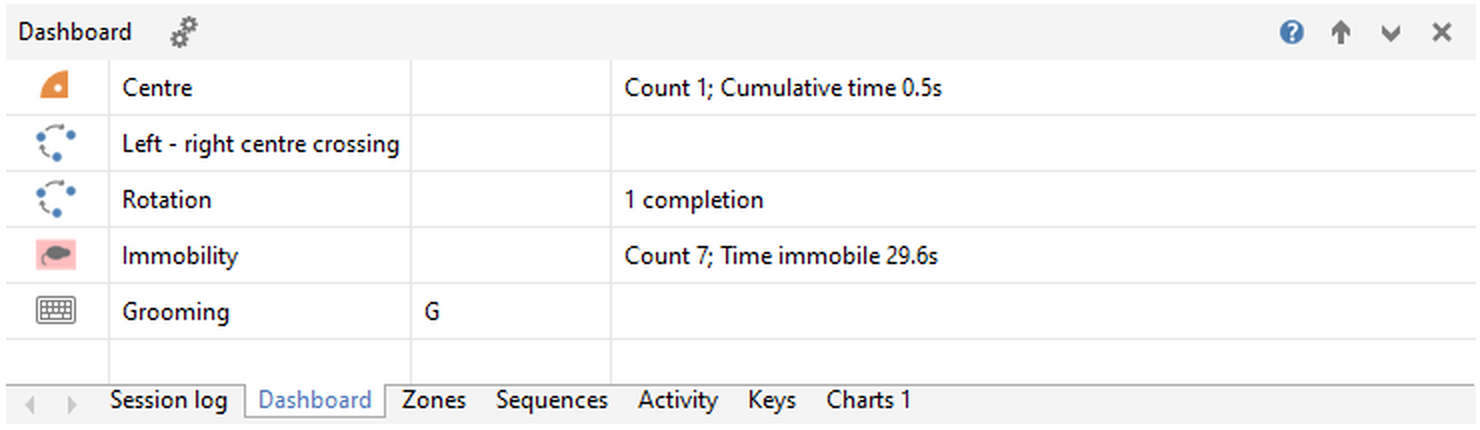
Figure 1. The Dashboard panel, set to show: entries to the Centre zone, information about two Sequences, data about Immobility, and 'Grooming' key presses.
Details
The following buttons are specific to this panel. If the panel is the promoted (main) panel, these will appear alongside the test control buttons in the tool bar at the top of the window; otherwise they will appear as the title of the tabbed section when the Dashboard panel is the currently-selected tab:
 | Dashboard settings - Shows a pop-up window allowing you to select which of the information from other panels to include on the Dashboard panel - see figure 2. |

Figure 2. The  button will pop up a window allowing you to select what to show on this panel.
Note that the settings you choose here can also be changed in the protocol, under What to show on the Dashboard panel.
When this panel is the selected tab, the right-hand side of the tabbed section's title will contain controls relevant to the tabbed display:
 | Show Help - Displays help on this panel. |
 | Promote panel - Promotes this panel to be the main panel of the Test window. |
 | Collapse tabs - Collapses the tabbed section, to give more space to the promoted panel. The tabbed section can be reinstated by clicking on any tab. |
 | Close panel - Closes this tab, removing it from the tabbed section. It can be re-added using the  Panel settings button on the ribbon bar, or the Test window panels section of the protocol. Panel settings button on the ribbon bar, or the Test window panels section of the protocol. |
The information in this panel will generally persist at the end of the test (depending on how you've set the Test window panel settings in the protocol). For more information, see Clearing test information ready for the next test.
See also:
| • | The Test window |
| • | The Session log panel |
| • | The Errors & Warnings panel |
| • | The Video panel |
| • | The Zones panel |
| • | The Sequences panel |
| • | The Activity panel |
| • | The Keys panel |
| • | The I/O Status panel |
| • | The Virtual Switches panel |
| • | The Charts panel |
| • | Clearing test information ready for the next test |

© Copyright 2003-2026 Stoelting Co. All rights reserved
ANY-maze help topic T0785